

TeamViewer (32bit)9.0.24322
 Gratis Download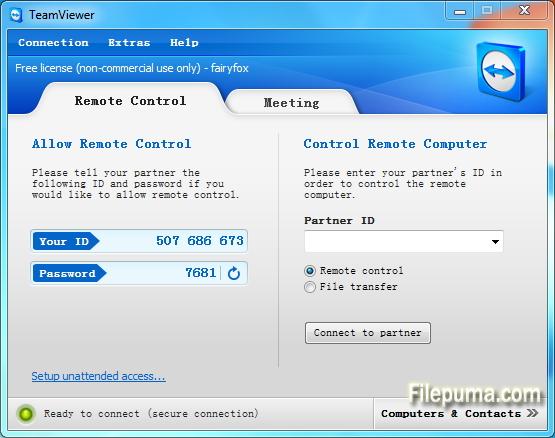
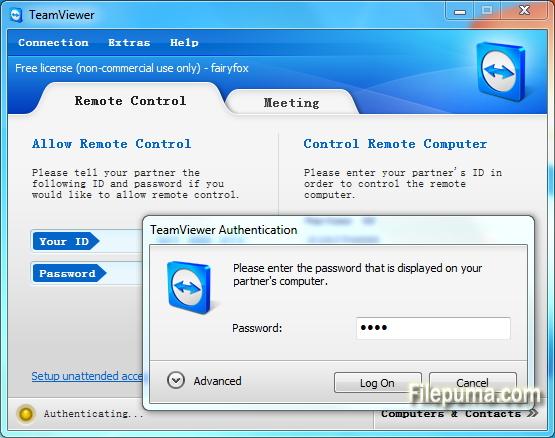
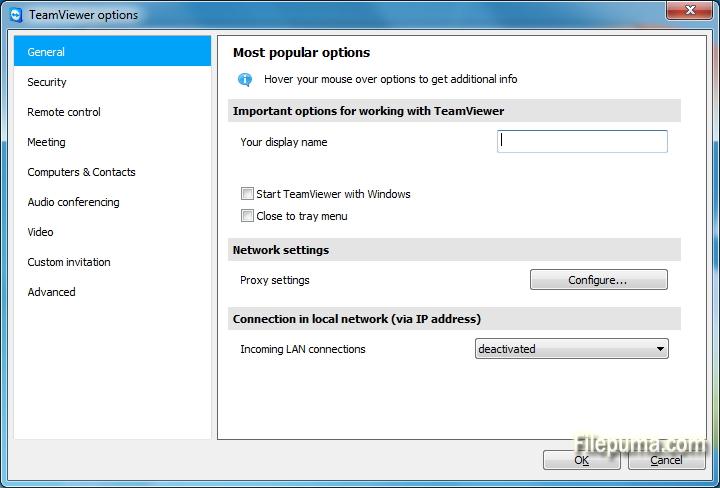
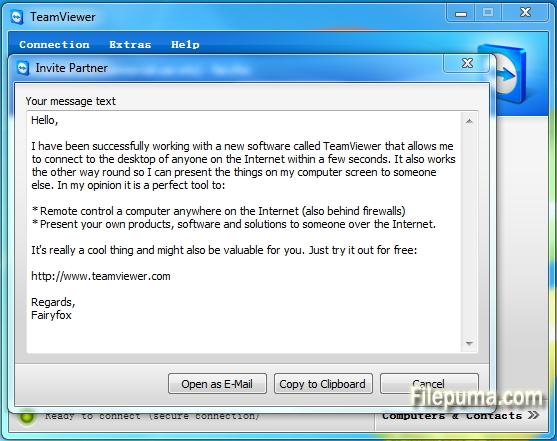


TeamVieweris een geavanceerd hulpmiddel voor externe toegang en samenwerking dat naadloze connectiviteit tussen apparaten over de hele wereld mogelijk maakt. Met zijn gebruiksvriendelijke interface en robuuste functies is TeamViewer een favoriete oplossing geworden voor zowel individuen als bedrijven.
In essentie stelt TeamViewer gebruikers in staat om op afstand apparaten moeiteloos te benaderen en te bedienen. Of je nu technische ondersteuning aan een collega moet bieden, toegang tot je werkcomputer vanuit huis nodig hebt, of wilt samenwerken aan een project met teamleden verspreid over de hele wereld, TeamViewer garandeert een veilige en efficiënte verbinding.
Een van de opvallende kenmerken van TeamViewer is de compatibiliteit tussen verschillende platforms, waarbij Windows, macOS, Linux en diverse mobiele besturingssystemen worden ondersteund. Deze veelzijdigheid maakt het een veelzijdige oplossing voor gebruikers met verschillende apparaatvoorkeuren.
Beveiliging is een topprioriteit voor TeamViewer, zoals blijkt uit de end-to-end encryptie en multi-factor authenticatie-opties. Gebruikers kunnen erop vertrouwen dat hun gegevens en verbindingen zijn beschermd, waardoor het een ideale keuze is voor zowel persoonlijk als professioneel gebruik.
De aanvullende functies van TeamViewer omvatten bestandsoverdracht, remote printing en een chatfunctie, waardoor naadloze communicatie en samenwerking worden bevorderd. Met zijn betrouwbaarheid, gebruiksgemak en krachtige mogelijkheden is TeamViewer een onmisbare tool geworden voor iedereen die op zoek is naar efficiënte oplossingen voor remote access en samenwerking.
Belangrijkste kenmerken:
- Remote Access: Bedien apparaten op afstand.
- Compatibiliteit tussen platformen: Verbind met verschillende besturingssystemen.
- Bestandsuitwisseling: Eenvoudig bestanden delen tijdens sessies.
- Cross-Browser Toegang: Toegang via verschillende webbrowsers.
- Vergaderingen en Presentaties: Voer online vergaderingen en presentaties uit.
- Veilige gegevensoverdracht: versleutelt gegevens voor veilige overdracht.
- Afdrukken op afstand: Afdrukken op afstand naar lokale printers.
- Hoogwaardige audio en video: Ondersteunt hoogwaardige audio en video.
- Multi-User Samenwerking: Werk samen met meerdere gebruikers.
- Onbeheerde toegang: Stel externe toegang in zonder toestemming.
- Wake-on-LAN: Maak een externe computer wakker.
- Aangepaste Branding: Brand het TeamViewer-interface.
- Integratie: Integreren met andere applicaties.
- Mobiele toegang: Gebruik mobiele apps voor externe toegang.
- Sessierecording: opnames van externe sessies maken.
Wat is nieuw?
New features:
- Open multiple connections in different tabs: Open multiple remote sessions in tabs, just like in your browser. For an optimal overview, you can also open all the monitors belonging to a remote computer in separate tabs. You won't miss a thing because opened tabs will always flash when new activity occurs on the remote computer, e.g. a new chat message from a customer.
- Wake-on-LAN with TeamViewer:Do you want to ensure 24/7 access to your computer without having to leave it running all the time? With the new Wake-on-LAN feature, you can now wake up your computer remotely whenever you need access. The wake feature simply works via another computer using TeamViewer within the local network or via a router.
- Protect your TeamViewer account with two factor authentication :Protect your TeamViewer account against unauthorized access with two factor authentication, just in case your password happens to land in the wrong hands. With an established authentication app (e.g. Google Authenticator), you can simply generate a security code with your smartphone. Both the code and the password are requested during login. With this two factor authentication, TeamViewer helps you meet HIPAA and PCI DSS requirements, among others.
- Ready for Windows 8.1 :Do you or your customers use Windows 8.1? No problem. TeamViewer 9 is also optimized for this operating system.
- Save customized customer modules :You can now save customized modules with your company branding (TeamViewer QuickSupport, QuickJoin or Host) in your Management Console. You or your customers simply download the created module via an individual link.
- Copy and paste files, images, and text via the clipboard :Copy files, folders, images, screenshots, text, and tables along with formatting from one computer to another via the clipboard. E.g. attach a local file to an email being sent from a remote computer..
- Simplified file transfer without establishing a connection :Send files to computers and contacts from your list without first needing to establish a connection. Using an FTP server to share large amounts of data or files that exceed your email attachment size limit is now a thing of the past. Starting now, simply use TeamViewer to share files with colleagues or customers in the blink of an eye.
- Process customer cases in the service queue together with your team :Now organize instant customer support in your team more easily. All service cases are collected in your service queue and identified based on a session code. You can now manually create a new session code and pass it on to your customer in the form of a link. Instead of sharing the TeamViewer ID and password, like you used to, the customer can now join the session directly with just a click. Alternatively, a code is created automatically, as soon as the customer launches your customized TeamViewer QuickSupport. In this way, new customer cases are added to your service queue.
- TeamViewer API for integration into your applications :Integrate TeamViewer with your systems, such as helpdesk, ticket, or CRM. The new TeamViewer API offers the option of seamlessly integrating TeamViewer functionalities into your own work environment:
- Quick connection via desktop shortcut :Add a shortcut to any computer so you can connect to it in the blink of an eye, any time, with just a double-click. Simply use drag & drop to pull the specific computer from your Computers & Contacts list to your desktop.
- Notifications - Everything at a glance :TeamViewer now informs you directly in your Computers & Contacts list when new notifications are available. Stay informed, regardless of where you happen to be.
- Optimized video :Video transfer is now even faster. Show your participant a video during a presentation or view YouTube videos on remote computers in real-time.
- Redesign for even easier use :New TeamViewer user interface and Computers & Contacts design. Experience a new touch-friendly design. Important buttons convert automatically when you use TeamViewer on a touch device.
- TeamViewer 9 users can still establish remote control connections with TeamViewer 3, 4, 5, 6, 7 and 8.
- For technical and licensing reasons, a remote control connection in the other direction, i.e., from TeamViewer 3, 4, 5, 6, 7 and 8 to TeamViewer 9, is not possible. Meetings with version 9 are also accessible for participants with version 7, 8, however, vice versa it is not possible due to the mentioned reasons.
Programma beschikbaar in andere talen
- Download TeamViewer (32bit)
- Télécharger TeamViewer (32bit)
- Herunterladen TeamViewer (32bit)
- Scaricare TeamViewer (32bit)
- ダウンロード TeamViewer (32bit)
- Descargar TeamViewer (32bit)
- Baixar TeamViewer (32bit)
Gebruikersbeoordelingen
Gebruikersbeoordeling
 221
221
Licentie:
Vrij
Vereisten:
Windows All
Talen:
Multi-languages
Grootte:
5.7MB
Uitgever:
Bijgewerkt:
Dec 3, 2013
Schoon
Rapportsoftware
Nieuwste versie
Oude versies
 TeamViewer (32bit) 15.73.5
 TeamViewer Portable 15.70.5
 TeamViewer (64bit) 15.73.5
 TeamViewer QuickSupport (64bit) 15.73.5
 TeamViewer QuickSupport (32bit) 15.73.5
 TeamViewer Host (64bit) 15.73.5
 TeamViewer Host (32bit) 15.73.5
 UltraVNC (64bit) 1.6.4.0
 UltraVNC (32bit) 1.6.4.0
Beveiligingsniveaus
Om eventuele schade aan uw apparaat te voorkomen en de veiligheid van uw gegevens en privacy te waarborgen, controleert ons team elke keer wanneer een nieuw installatiebestand naar onze servers wordt geüpload of aan een externe server wordt gekoppeld, en beoordeelt het bestand periodiek om de status te bevestigen of bij te werken. Op basis van deze controles stellen we de volgende veiligheidsniveaus in voor alle downloadbare bestanden.
 Schoon
Het is zeer waarschijnlijk dat dit softwareprogramma schoon is.
We hebben bestanden en URL's die aan dit softwareprogramma zijn gekoppeld gescand in meer dan 60 van 's werelds toonaangevende antivirusdiensten; er zijn geen mogelijke bedreigingen gevonden. En er is geen software van derden gebundeld.
 Waarschuwing
Dit programma wordt ondersteund door advertenties en kan aanbieden om programma's van derden te installeren die niet vereist zijn. Dit kan een werkbalk, het wijzigen van je startpagina, de standaard zoekmachine of het installeren van andere programma's van derden omvatten. Dit kunnen valse positieven zijn, en onze gebruikers worden aangeraden voorzichtig te zijn bij het installeren en gebruiken van deze software.
 Gehandicapt
Deze software is niet langer beschikbaar voor download. Het is zeer waarschijnlijk dat dit softwareprogramma kwaadwillig is of veiligheidsproblemen of andere redenen heeft.
Dien een rapport in
Dank je wel!
Je rapport is verstuurd.
We zullen uw verzoek beoordelen en passende maatregelen nemen.
Houd er rekening mee dat u geen notificatie zult ontvangen over enige actie die is ondernomen vanwege dit rapport. Onze excuses voor het ongemak dat dit kan veroorzaken.
We waarderen je hulp bij het schoon en veilig houden van onze website.