
If you are looking for files on your computer, it is good to make sure that your search also includes the sub-folders and all folders in the drive where you are searching.
Here is how to always include sub-directories when searching for files in your computer:
Step One. Open Windows explorer and click on the drive (usually “C:”) where you want to search for a file:

Step Two. Next, click onside the typing field on the top right-most corner which says “Search Local Disk…”:

Step Three. From the buttons on the top left side corner, make sure the button “All subfolders” is pressed:
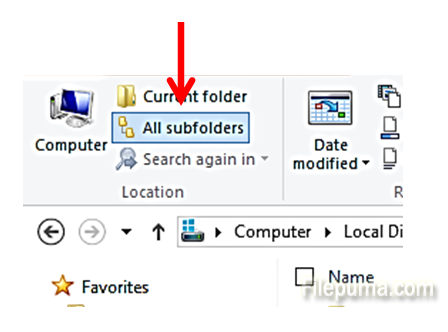
Now your searches will include all subfolders within disc C:.
Leave a Reply