

FinePrint8.22
 Free Trial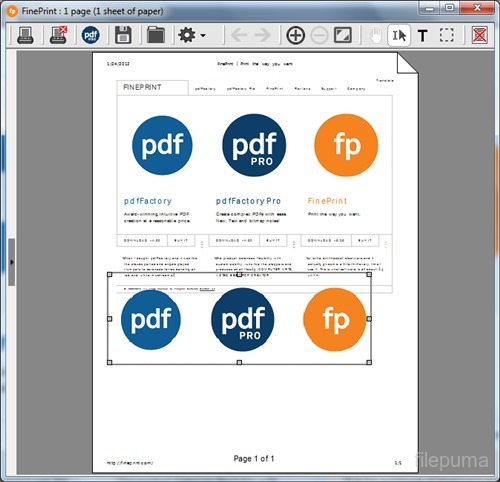


FinePrint is a software program designed for Windows computers that allows users to preview and manipulate print jobs before they are sent to a printer. The program allows users to preview their print jobs, delete pages, change the page order, and even combine multiple print jobs into a single document. FinePrint also includes features such as the ability to print double-sided pages, create booklets, and print multiple pages on a single sheet of paper.
FinePrint is often used by businesses and individuals who want to save paper and ink by eliminating unnecessary pages or combining multiple documents into a single print job. The program can be integrated with popular applications such as Microsoft Word and Adobe Acrobat, making it easy to use for a wide range of users.
In addition to its printing features, FinePrint also includes a built-in PDF creator that allows users to create PDF files from any application that can print. This feature can be particularly useful for creating electronic versions of documents that can be easily shared and viewed on a variety of devices.
FinePrint is available for purchase from the FinePrint Software website, and a free trial version is also available for users who want to try out the program before buying.
Key Features:
- Preview the printing operation and adjust it before printing.
- Combine multiple printing operations into one document for effective printing.
- Save paper and ink by printing multiple pages on one piece of paper.
- Add watermarks, header, foot, and other custom elements to the printing document.
- Create a custom page layout, such as a booklet or a poster.
- Delete unwanted pages or text from printing operations.
- Convert the printing operation to PDF format.
- Integrate with other software applications for seamless printing.
- Support batch printing of large printing operations.
- Provide a user -friendly interface to facilitate navigation and custom.
What's New
- fixed problems when printing onto exact subdivisions of paper sizes, e.g. 2-up A5 onto A4 paper, 2-up Letter onto Tabloid paper, etc.
- the onscreen page display now correctly represents the printable and unprintable areas of the currently selected physical printer
- you can now sort the list of print jobs by clicking on the job name column header. The first click sorts the list in ascending order, the second click sorts in descending order, and the third click restores the original order.
- the “Crop all pages” command no longer trims the crop rectangle to the content of the selected page
- the “Crop all pages” command now works silently instead of scrolling through the pages onscreen
- changing the Double-sided, Repeat pages, or Separate jobs settings now works correctly in thumbnail view
- fixed a bug where custom paper sizes sometimes could not be deleted
- Ctrl-A now selects all pages. To deselect a page you can Ctrl-click on that page.
- fixed a problem where the Jobs list on the Layout tab sometimes was not shown even when the session contained more than one job
Program available in other languages
- Télécharger FinePrint
- Herunterladen FinePrint
- Scaricare FinePrint
- ダウンロード FinePrint
- Descargar FinePrint
- Baixar FinePrint
User Reviews
User Rating
 14
14
License:
Free Trial
Requirements:
Windows XP SP2/ Vista/ Windows 7/ Windows 8
Languages:
Multi-languages
Size:
7.8MB
Publisher:
Updated:
Mar 1, 2015
Clean
Report Software
Latest Version
Old Versions
 pdfFactory 9.17
 pdfFactory Pro 9.17
 FinePrint 12.17
 PDFCreator 6.2.1
 doPDF 11.9.512
 Sweet Home 3D 7.6
 PhotoPad Image Editor 14.48
 WinDjView 2.1
Security Levels
To avoid any potential harm to your device and ensure the security of your data and privacy, our team checks every time a new installation file is uploaded to our servers or linked to a remote server and periodically reviews the file to confirm or update its status. Based on this checking, we set the following security levels for any downloadable files.
 Clean
Clean
It is highly likely that this software program is clean.
We scanned files and URLs associated with this software program in more than 60 of the world's leading antivirus services; no possible threats were found. And there is no third-party softwarebundled.
 Warning
This program is advertising supported and may offer to install third-party programs that are not required. These may include a toolbar, changing your homepage, default search engine, or installing other party programs. These could be false positives, and our users are advised to be careful when installing and using this software.
 Disabled
This software is no longer available for download. It is highly likely that this software program is malicious or has security issues or other reasons.
Submit a Report
Thank you!
Your report has been sent.
We will review your request and take appropriate action.
Please note that you will not receive a notification about anyaction taken dueto this report.We apologize for anyinconvenience this may cause.
We appreciate your help in keeping our website clean and safe.