
Looking for a free Mac cleaner? Try diCleaner

Process Monitor4.02
 Free Download
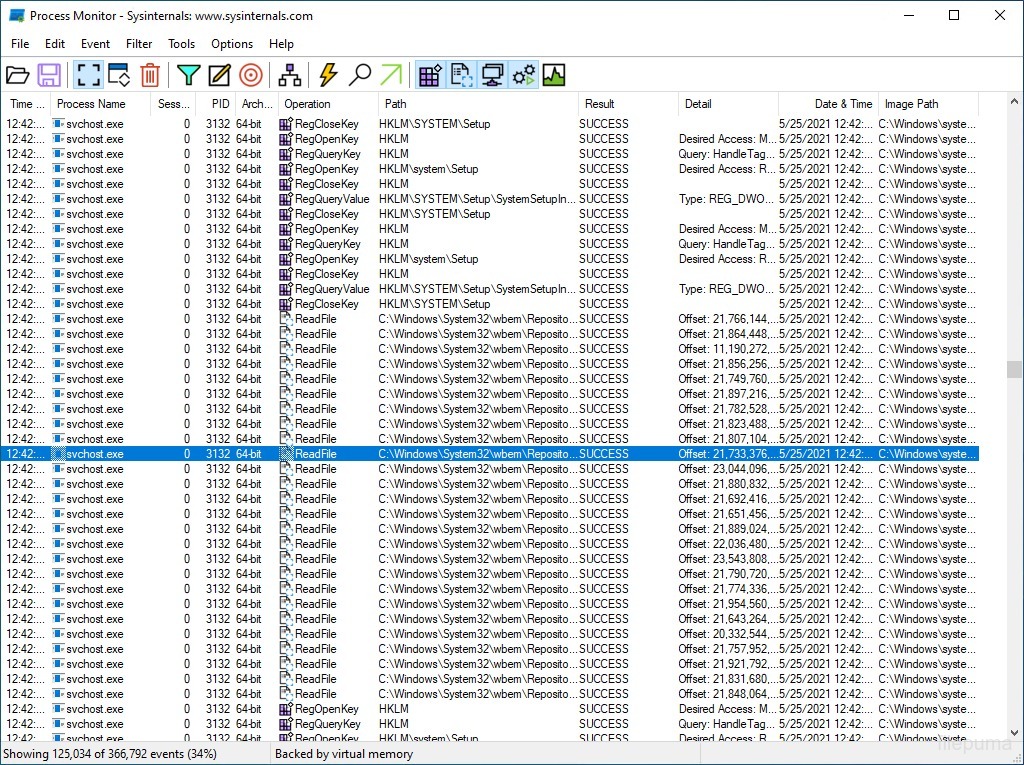
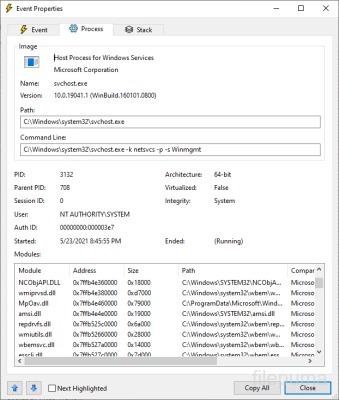


Process Monitor is a utility that shows real-time activity on a computer. It tracks events from the operating system, such as file access, registry changes, and process activity. Users can see which operations happen in the background and how different parts of the system interact. This helps to understand system behavior and identify unusual actions.
The interface presents a continuous stream of events with detailed information. Each entry includes the type of operation, the process name, and the result. Filters can be applied to focus on specific processes or actions. This makes it easier to track events without being overwhelmed by all activity on the system.
It is useful for examining system errors and troubleshooting performance problems. For example, it can show which application is causing high disk usage or why a program cannot access a specific file. By monitoring events as they happen, users can pinpoint the exact source of an issue.
Process Monitor also assists in studying system behavior during installation or updates. Observing how files and registry entries are modified provides insights into software installation patterns. Learning these details can improve understanding of system operations and help maintain a stable environment.
Key Features:
- Real-time Monitoring – Tracks file system, registry, and process/thread activity as it happens.
- Detailed Event Logging – Provides comprehensive details about each operation, including process name, path, result, and timestamp.
- Advanced Filtering – Lets you filter events by process, operation type, path, or other criteria to focus on specific activities.
- Process Tree View – Shows parent-child relationships of processes to help trace activity origin.
- Stack Traces – Captures call stacks for operations, useful for debugging complex software issues.
- Export & Save Logs – Allows saving captured data for later analysis or sharing with others.
- Highlighting & Search – Quickly spot specific events using color highlighting and search functions.
Program available in other languages
- Télécharger Process Monitor
- Herunterladen Process Monitor
- Scaricare Process Monitor
- ダウンロード Process Monitor
- Descargar Process Monitor
- Baixar Process Monitor
User Reviews
User Rating

License:
Free
Requirements:
Windows 8/ Windows 10/ Windows 11
Languages:
Multi-languages
Size:
2.88 MB
Publisher:
Updated:
May 9, 2026
Clean
Report Software
Latest Version
Old Versions
 Autoruns 14.3
 Process Explorer 17.14
 RAMMap 1.63
 Process Monitor 4.12
 Glary Utilities 6.49.0.53
 Glary Utilities Pro 6.49.0.53
 CCleaner 7.13
 Driver Booster 14.0.1.462
 CrystalDiskInfo 9.9.3
Security Levels
To avoid any potential harm to your device and ensure the security of your data and privacy, our team checks every time a new installation file is uploaded to our servers or linked to a remote server and periodically reviews the file to confirm or update its status. Based on this checking, we set the following security levels for any downloadable files.
 Clean
Clean
It is highly likely that this software program is clean.
We scanned files and URLs associated with this software program in more than 60 of the world's leading antivirus services; no possible threats were found. And there is no third-party softwarebundled.
 Warning
This program is advertising supported and may offer to install third-party programs that are not required. These may include a toolbar, changing your homepage, default search engine, or installing other party programs. These could be false positives, and our users are advised to be careful when installing and using this software.
 Disabled
This software is no longer available for download. It is highly likely that this software program is malicious or has security issues or other reasons.
Submit a Report
Thank you!
Your report has been sent.
We will review your request and take appropriate action.
Please note that you will not receive a notification about anyaction taken dueto this report.We apologize for anyinconvenience this may cause.
We appreciate your help in keeping our website clean and safe.