

VirtualBox4.2.12
 Free Download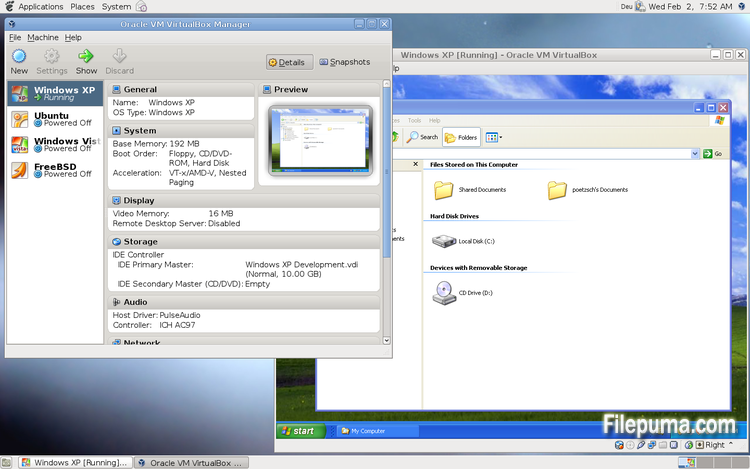
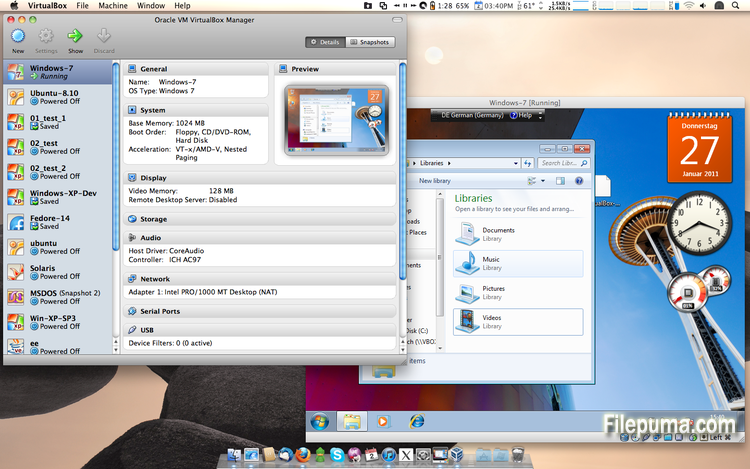
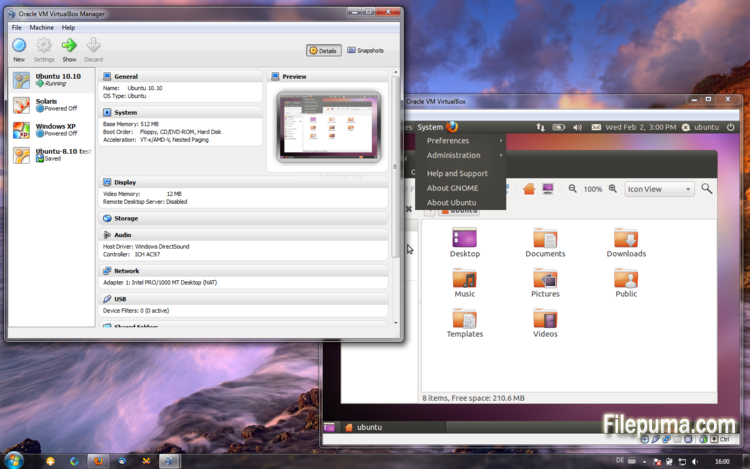


VirtualBox is a free and open-source virtualization software that allows users to create and run virtual machines on their computers. With VirtualBox, users can install and run multiple operating systems simultaneously on their computer without having to create separate partitions or buy additional hardware.
one of the main advantages of VirtualBox is its ease of use. It is simple to install and set up, even for those who have little or no experience with virtualization technology. VirtualBox also offers a wide range of customization options, including the ability to adjust the amount of RAM, CPU cores, and hard disk space allocated to each virtual machine.
Another great feature of VirtualBox is its compatibility with a wide range of operating systems. Users can install and run Windows, Linux, macOS, and many other operating systems on their virtual machines. This makes it an excellent tool for developers, software testers, and anyone who needs to run multiple operating systems on a single computer.
VirtualBox also offers a range of advanced features, such as support for USB devices, shared folders, and network adapters. These features make it possible to run software that requires hardware or network resources, such as virtual routers, firewalls, and servers.
VirtualBox is an excellent choice for anyone who needs to run multiple operating systems on a single computer. Its ease of use, wide range of customization options, and compatibility with many different operating systems make it a versatile and powerful tool for developers, IT professionals, and home users alike.
Key Feature:
- Cross-platform compatibility.
- Intuitive graphical user interface.
- Support for various operating systems.
- Seamless integration with host operating system.
- Snapshots and clones.
- Networking capabilities.
- Virtual device support.
- Extension packs for additional functionality.
What's New
VirtualBox 4.2.12 (release 2013-04-12)
This is a maintenance release. The following items were fixed and/or added:
- VMM: fixed a Guru Meditation on putting Linux guest CPU online if nested paging is disabled
- VMM: invalidate TLB entries even for non-present pages
- GUI: Multi-screen support: fixed a crash on visual-mode change
- GUI: Multi-screen support: disabled guest-screens should now remain disabled on visual-mode change
- GUI: Multi-screen support: handle host/guest screen plugging/unplugging in different visual-modes
- GUI: Multi-screen support: seamless mode: fixed a bug when empty seamless screens were represented by fullscreen windows
- GUI: Multi-screen support: each machine window in multi-screen configuration should have correct menu-bar now (Mac OS X hosts)
- GUI: Multi-screen support: machine window View menu should have correct content in seamless/fullscreen mode now (Mac OS X hosts)
- GUI: VM manager: vertical scroll-bars should be now updated on content/window resize
- GUI: VM settings: fixed crash on machine state-change event
- GUI: don't show warnings about enabled or disabled mouse integration if the VM was restored from a saved state
- Virtio-net: properly announce that the guest has to handle partial TCP checksums (bug #9380)
- Storage: Fixed incorrect alignment of VDI images causing disk size changes when using snapshots (bug #11597)
- Audio: fixed broken ALSA & PulseAudio on some Linux hosts due to invalid symbol resolution (bug #11615)
- PS/2 keyboard: re-apply keyboard repeat delay and rate after a VM was restored from a saved state (bug #10933)
- BIOS: updated DMI processor information table (type 4): corrected L1 & L2 cache table handles
- Timekeeping: fix several issues which can lead to incorrect time, Solaris guests sporadically showed time going briefly back to Jan 1 1970
- Main/Metrics: disk metrics are collected properly when software RAID, symbolic links or rootfs are used on Linux hosts
- VBoxManage: don't stay paused after a snapshot was created and the VM was running before
- VBoxManage: introduced controlvm nicpromisc (bug #11423)
- VBoxManage: don't crash on controlvm guestmemoryballoon if the VM isn't running (bug #11639)
- VBoxHeadless: don't filter guest property events as this would affect all clients (bug #11644)
- Guest control: prevent double CR in the output generated by guest commands and do NLS conversion
- Linux hosts / guests: fixed build errors on Linux 3.5 and newer kernels if the CONFIG_UIDGID_STRICT_TYPE_CHECKS config option is enabled (bug #11664)
- Linux Additions: handle fall-back to VESA driver on RedHat-based guests if vboxvideo cannot be loaded
- Linux Additions: RHEL/OEL/CentOS 6.4 compile fix (bug #11586)
- Linux Additions: Debian Linux kernel 3.2.0-4 (3.2.39) compile fix (bug #11634)
- Linux Additions: added auto-logon support for Linux guests using LightDM as the display manager
- Windows Additions: Support for multimonitor. Dynamic enable/disable of secondary virtual monitors. Support for XPDM/WDDM based guests
- X11 Additions: support X.Org Server 1.14 (bug #11609)
Program available in other languages
- Télécharger VirtualBox
- Herunterladen VirtualBox
- Scaricare VirtualBox
- ダウンロード VirtualBox
- Descargar VirtualBox
- Baixar VirtualBox
User Reviews
User Rating
 101
101
License:
Free
Requirements:
Windows All
Languages:
Multi-languages
Size:
94.5MB
Publisher:
Updated:
Apr 14, 2013
Clean
Report Software
Latest Version
Old Versions
Developer's Software
 VirtualBox 7.2.4
 Adobe Air 51.2.2.6
 Java Runtime Environment (32bit) 8 Update 471
 Java Runtime Environment (64bit) 8 Update 471
 Java Development Kit (64bit) 8 Update 471
 Python (64bit) 3.14.2
Security Levels
To avoid any potential harm to your device and ensure the security of your data and privacy, our team checks every time a new installation file is uploaded to our servers or linked to a remote server and periodically reviews the file to confirm or update its status. Based on this checking, we set the following security levels for any downloadable files.
 Clean
Clean
It is highly likely that this software program is clean.
We scanned files and URLs associated with this software program in more than 60 of the world's leading antivirus services; no possible threats were found. And there is no third-party softwarebundled.
 Warning
This program is advertising supported and may offer to install third-party programs that are not required. These may include a toolbar, changing your homepage, default search engine, or installing other party programs. These could be false positives, and our users are advised to be careful when installing and using this software.
 Disabled
This software is no longer available for download. It is highly likely that this software program is malicious or has security issues or other reasons.
Submit a Report
Thank you!
Your report has been sent.
We will review your request and take appropriate action.
Please note that you will not receive a notification about anyaction taken dueto this report.We apologize for anyinconvenience this may cause.
We appreciate your help in keeping our website clean and safe.