

VirtualBox4.3.28
 Free Download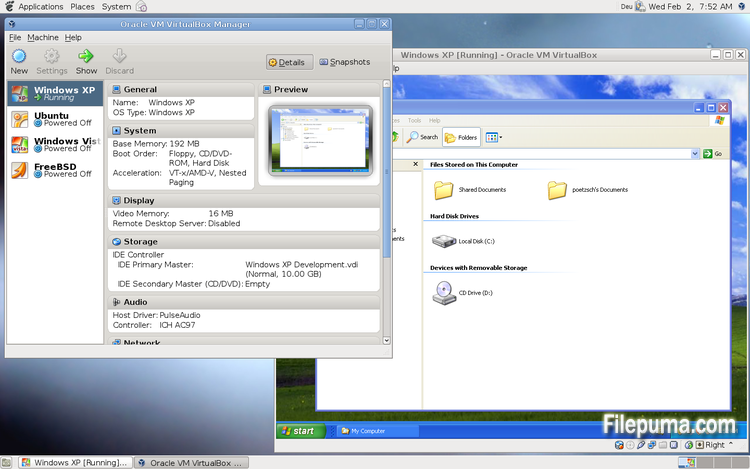
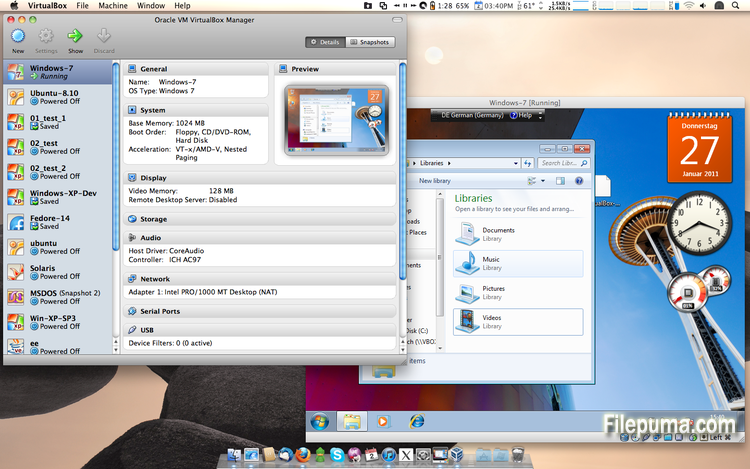
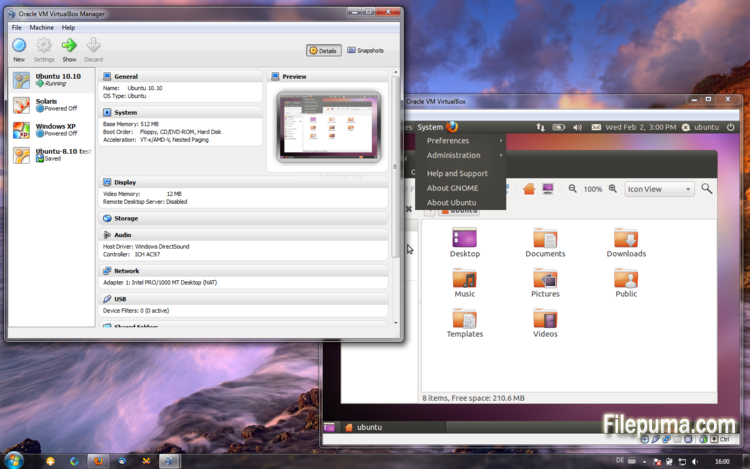


VirtualBox is a free and open-source virtualization software that allows users to create and run virtual machines on their computers. With VirtualBox, users can install and run multiple operating systems simultaneously on their computer without having to create separate partitions or buy additional hardware.
one of the main advantages of VirtualBox is its ease of use. It is simple to install and set up, even for those who have little or no experience with virtualization technology. VirtualBox also offers a wide range of customization options, including the ability to adjust the amount of RAM, CPU cores, and hard disk space allocated to each virtual machine.
Another great feature of VirtualBox is its compatibility with a wide range of operating systems. Users can install and run Windows, Linux, macOS, and many other operating systems on their virtual machines. This makes it an excellent tool for developers, software testers, and anyone who needs to run multiple operating systems on a single computer.
VirtualBox also offers a range of advanced features, such as support for USB devices, shared folders, and network adapters. These features make it possible to run software that requires hardware or network resources, such as virtual routers, firewalls, and servers.
VirtualBox is an excellent choice for anyone who needs to run multiple operating systems on a single computer. Its ease of use, wide range of customization options, and compatibility with many different operating systems make it a versatile and powerful tool for developers, IT professionals, and home users alike.
Key Feature:
- Cross-platform compatibility.
- Intuitive graphical user interface.
- Support for various operating systems.
- Seamless integration with host operating system.
- Snapshots and clones.
- Networking capabilities.
- Virtual device support.
- Extension packs for additional functionality.
What's New
- VMM: fixed a Guru Meditation when rebooting certain guests (for example Solaris doing fast reboot) by fixing the implementation for INIT IPI
- VMM: added some information for diagnosing rare VERR_VMX_INVALID_VMXON_PTR Guru Meditations (VT-x only)
- GUI: HID LEDs sync: prevent synchronization if VM window has no focus (Windows and Mac OS X hosts only)
- GUI: fixed drag and drop moving the cursor between guest screens on certain hosts
- 3D: fixed a crash on restoring the VM state on X11 hosts (bug #12737)
- 3D: fixed a crash on Linux guest shutdown (bug #12772)
- VRDP: fixed incompatibility with rdesktop 1.8.3
- VRDP: fixed listening for IPv6 on some systems (bug #14038)
- Storage: don't crash if creating an asynchronous I/O context fails (e.g. when starting many VMs) and show a proper error message
- Floppy: several fixes
- Audio: improved the behavior of the volume control for the HD audio device emulation
- USB: increase the number of supported drivers from 3 to 5 (Windows hosts only)
- PS/2 keyboard: synchronize the LED state on VM restore (Windows and Mac OS X hosts only)
- NAT Network: when running multiple NAT networks with multiple VMs, only stop the respective services when stopping VMs (bug #14090)
- NAT: don't kill UDP bindings on ICMP errors (bug #13475)
- NAT: bandwidth limit now works properly with NAT (bug #11485)
- BIOS: fixed the returned size value of the VBE 2.0 PMI function 0Ah (4.2.0 regression; bug #14096)
- Guest Control: fixed parameter quoting in Windows guests (bug #13157)
- Webcam passthrough improvements for Linux (V4L2) hosts to support more webcam models
- API: don't fail starting a VM with VBOX_E_INVALID_OBJECT_STATE under certain conditions (bug #13617)
- API: be more verbose on VBOX_E_INVALID_OBJECT_STATE if a medium is attached to a running VM (bug #13560)
- API: fixed a bug which could result in losing certain screen resize events with multi-monitor guests
- rdesktop-vrdp: fixed path to the keymaps (bug #12066)
- rdesktop-vrdp: switch to version 1.8.3
- Windows hosts: more hardening fixes (e.g. bugs #14051, #14052)
- Linux hosts: another fix for activated SMAP on Linux 3.19 and newer (Broadwell and later; bug #13961)
- Linux hosts: Linux 4.1 compile fix (bug #14081)
- Solaris hosts: fixed using of VNIC templates with Crossbow based bridged networking to be compatible with vanity interface names
- Mac OS X hosts: fixed crash during VM termination under rare circumstances
- Windows Additions/WDDM: improved video memory utilization and allow more/bigger guest screens with large resolutions (including HiDPI)
- X11 Additions: prevent flickering when updating mouse cursor
- Solaris Additions: fixed incorrect usage of 'prtconf' while installing Guest Additions (Solaris 10 only)
Program available in other languages
- Télécharger VirtualBox
- Herunterladen VirtualBox
- Scaricare VirtualBox
- ダウンロード VirtualBox
- Descargar VirtualBox
- Baixar VirtualBox
User Reviews
User Rating
 101
101
License:
Free
Requirements:
Windows All
Languages:
Multi-languages
Size:
106MB
Publisher:
Updated:
May 18, 2015
Clean
Report Software
Latest Version
Old Versions
Developer's Software
 VirtualBox 7.2.4
 Adobe Air 51.2.2.6
 Java Runtime Environment (32bit) 8 Update 471
 Java Runtime Environment (64bit) 8 Update 471
 Java Development Kit (64bit) 8 Update 471
 Python (64bit) 3.14.2
Security Levels
To avoid any potential harm to your device and ensure the security of your data and privacy, our team checks every time a new installation file is uploaded to our servers or linked to a remote server and periodically reviews the file to confirm or update its status. Based on this checking, we set the following security levels for any downloadable files.
 Clean
Clean
It is highly likely that this software program is clean.
We scanned files and URLs associated with this software program in more than 60 of the world's leading antivirus services; no possible threats were found. And there is no third-party softwarebundled.
 Warning
This program is advertising supported and may offer to install third-party programs that are not required. These may include a toolbar, changing your homepage, default search engine, or installing other party programs. These could be false positives, and our users are advised to be careful when installing and using this software.
 Disabled
This software is no longer available for download. It is highly likely that this software program is malicious or has security issues or other reasons.
Submit a Report
Thank you!
Your report has been sent.
We will review your request and take appropriate action.
Please note that you will not receive a notification about anyaction taken dueto this report.We apologize for anyinconvenience this may cause.
We appreciate your help in keeping our website clean and safe.