

TeamViewer (32bit)9.0.24322
 Download gratuito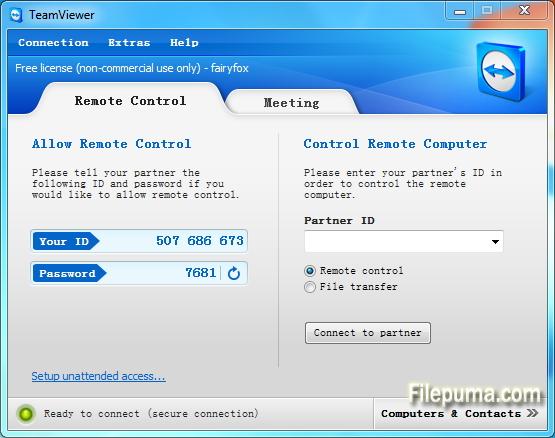


TeamViewerè uno strumento all'avanguardia per l'accesso remoto e la collaborazione che facilita la connettività senza interruzioni tra dispositivi in tutto il mondo. Con la sua interfaccia intuitiva e le sue caratteristiche robuste, TeamViewer è diventato una soluzione di riferimento per privati e aziende.
Al suo centro, TeamViewer consente agli utenti di accedere e controllare dispositivi remoti senza sforzo. Che tu abbia bisogno di fornire supporto tecnico a un collega, accedere al tuo computer di lavoro da casa, o collaborare a un progetto con membri del team sparsi in tutto il mondo, TeamViewer garantisce una connessione sicura ed efficiente.
Una delle caratteristiche distintive di TeamViewer è la sua compatibilità multipiattaforma, supportando Windows, macOS, Linux e vari sistemi operativi mobili. Questa versatilità lo rende una soluzione versatile per gli utenti con preferenze di dispositivi diverse.
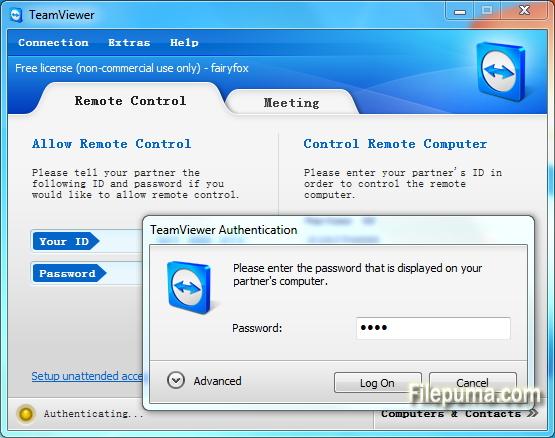
La sicurezza è una priorità assoluta per TeamViewer, come dimostrato dalla sua crittografia end-to-end e dalle opzioni di autenticazione multi-fattore. Gli utenti possono sentirsi sicuri che i loro dati e connessioni siano protetti, rendendolo una scelta ideale sia per uso personale che professionale.
Le funzionalità aggiuntive di TeamViewer includono il trasferimento di file, la stampa remota e una funzione di chat, promuovendo una comunicazione e collaborazione senza interruzioni. Con la sua affidabilità, facilità d'uso e potenti capacità, TeamViewer è diventato uno strumento indispensabile per chi cerca soluzioni efficienti per l'accesso remoto e la collaborazione.
Caratteristiche principali:
- Accesso remoto: Controlla i dispositivi a distanza.
- Compatibilità multipiattaforma: Connettiti tra diversi sistemi operativi.
- Trasferimento di file: condividi facilmente file durante le sessioni.
- Accesso Multibrowser: Accesso tramite vari browser web.
- Riunioni e Presentazioni: Conduci riunioni e presentazioni online.
- Trasferimento Sicuro dei Dati: Cripta i dati per il trasferimento sicuro.
- Stampa remota: Stampa a distanza su stampanti locali.
- Audio e Video di Alta Qualità: Supporta audio e video di qualità.
- Collaborazione multiutente: collabora con più utenti.
- Accesso non presidiato: Configura l'accesso remoto senza permesso.
- Wake-on-LAN: Sveglia un computer remoto.
- Branding personalizzato: personalizza l'interfaccia di TeamViewer.
- Integrazione: integra con altre applicazioni.
- Accesso mobile: Usa le app mobili per l'accesso remoto.
- Registrazione di sessioni: Registra sessioni remote.
Novità
New features:
- Open multiple connections in different tabs: Open multiple remote sessions in tabs, just like in your browser. For an optimal overview, you can also open all the monitors belonging to a remote computer in separate tabs. You won't miss a thing because opened tabs will always flash when new activity occurs on the remote computer, e.g. a new chat message from a customer.
- Wake-on-LAN with TeamViewer:Do you want to ensure 24/7 access to your computer without having to leave it running all the time? With the new Wake-on-LAN feature, you can now wake up your computer remotely whenever you need access. The wake feature simply works via another computer using TeamViewer within the local network or via a router.
- Protect your TeamViewer account with two factor authentication :Protect your TeamViewer account against unauthorized access with two factor authentication, just in case your password happens to land in the wrong hands. With an established authentication app (e.g. Google Authenticator), you can simply generate a security code with your smartphone. Both the code and the password are requested during login. With this two factor authentication, TeamViewer helps you meet HIPAA and PCI DSS requirements, among others.
- Ready for Windows 8.1 :Do you or your customers use Windows 8.1? No problem. TeamViewer 9 is also optimized for this operating system.
- Save customized customer modules :You can now save customized modules with your company branding (TeamViewer QuickSupport, QuickJoin or Host) in your Management Console. You or your customers simply download the created module via an individual link.
- Copy and paste files, images, and text via the clipboard :Copy files, folders, images, screenshots, text, and tables along with formatting from one computer to another via the clipboard. E.g. attach a local file to an email being sent from a remote computer..
- Simplified file transfer without establishing a connection :Send files to computers and contacts from your list without first needing to establish a connection. Using an FTP server to share large amounts of data or files that exceed your email attachment size limit is now a thing of the past. Starting now, simply use TeamViewer to share files with colleagues or customers in the blink of an eye.
- Process customer cases in the service queue together with your team :Now organize instant customer support in your team more easily. All service cases are collected in your service queue and identified based on a session code. You can now manually create a new session code and pass it on to your customer in the form of a link. Instead of sharing the TeamViewer ID and password, like you used to, the customer can now join the session directly with just a click. Alternatively, a code is created automatically, as soon as the customer launches your customized TeamViewer QuickSupport. In this way, new customer cases are added to your service queue.
- TeamViewer API for integration into your applications :Integrate TeamViewer with your systems, such as helpdesk, ticket, or CRM. The new TeamViewer API offers the option of seamlessly integrating TeamViewer functionalities into your own work environment:
- Quick connection via desktop shortcut :Add a shortcut to any computer so you can connect to it in the blink of an eye, any time, with just a double-click. Simply use drag & drop to pull the specific computer from your Computers & Contacts list to your desktop.
- Notifications - Everything at a glance :TeamViewer now informs you directly in your Computers & Contacts list when new notifications are available. Stay informed, regardless of where you happen to be.
- Optimized video :Video transfer is now even faster. Show your participant a video during a presentation or view YouTube videos on remote computers in real-time.
- Redesign for even easier use :New TeamViewer user interface and Computers & Contacts design. Experience a new touch-friendly design. Important buttons convert automatically when you use TeamViewer on a touch device.
- TeamViewer 9 users can still establish remote control connections with TeamViewer 3, 4, 5, 6, 7 and 8.
- For technical and licensing reasons, a remote control connection in the other direction, i.e., from TeamViewer 3, 4, 5, 6, 7 and 8 to TeamViewer 9, is not possible. Meetings with version 9 are also accessible for participants with version 7, 8, however, vice versa it is not possible due to the mentioned reasons.
Programma disponibile in altre lingue
- Download TeamViewer (32bit)
- Télécharger TeamViewer (32bit)
- Herunterladen TeamViewer (32bit)
- ダウンロード TeamViewer (32bit)
- Descargar TeamViewer (32bit)
- Baixar TeamViewer (32bit)
Recensioni degli utenti
Valutazione dell'utente
 221
221
Licenza:
Gratis
Requisiti:
Windows All
Lingue:
Multi-languages
Taglia:
5.7MB
Editore:
Aggiornato:
Dec 3, 2013
Pulito
Segnala il software
Ultima versione
Vecchie versioni
Software dello sviluppatore
 TeamViewer (32bit) 15.76.3
 TeamViewer Portable 15.70.5
 TeamViewer (64bit) 15.76.3
 TeamViewer Host (64bit) 15.76.3
 TeamViewer Host (32bit) 15.76.3
 UltraVNC (64bit) 1.6.4.0
 UltraVNC (32bit) 1.6.4.0
Livelli di Sicurezza
Per evitare qualsiasi potenziale danno al tuo dispositivo e garantire la sicurezza dei tuoi dati e della tua privacy, il nostro team controlla ogni volta che un nuovo file di installazione viene caricato sui nostri server o collegato a un server remoto e riesamina periodicamente il file per confermarne o aggiornarne lo stato. Sulla base di questo controllo, impostiamo i seguenti livelli di sicurezza per qualsiasi file scaricabile.
 Pulito
È molto probabile che questo programma software sia pulito.
Abbiamo scansionato file e URL associati a questo programma software in oltre 60 dei principali servizi antivirus del mondo; non sono state trovate minacce possibili. E non ci sono software di terze parti inclusi.
 Avvertimento
Questo programma è supportato dalla pubblicità e potrebbe offrire l'installazione di programmi di terze parti che non sono necessari. Questi possono includere una barra degli strumenti, il cambiamento della tua homepage, del motore di ricerca predefinito o l'installazione di altri programmi di terze parti. Questi potrebbero essere falsi positivi e si consiglia ai nostri utenti di essere cauti durante l'installazione e l'utilizzo di questo software.
 Disabile
Questo software non è più disponibile per il download. È altamente probabile che questo programma software sia dannoso o abbia problemi di sicurezza o altri motivi.
Presenta un rapporto
Grazie!
Il tuo rapporto è stato inviato.
Esamineremo la tua richiesta e prenderemo le misure opportune.
Si prega di notare che non riceverai una notifica riguardante qualsiasi azione intrapresa a causa di questo rapporto. Ci scusiamo per qualsiasi inconveniente che ciò possa causare.
Apprezziamo il tuo aiuto nel mantenere il nostro sito web pulito e sicuro.