

AIMP3.60 Build 1465
 無料ダウンロード
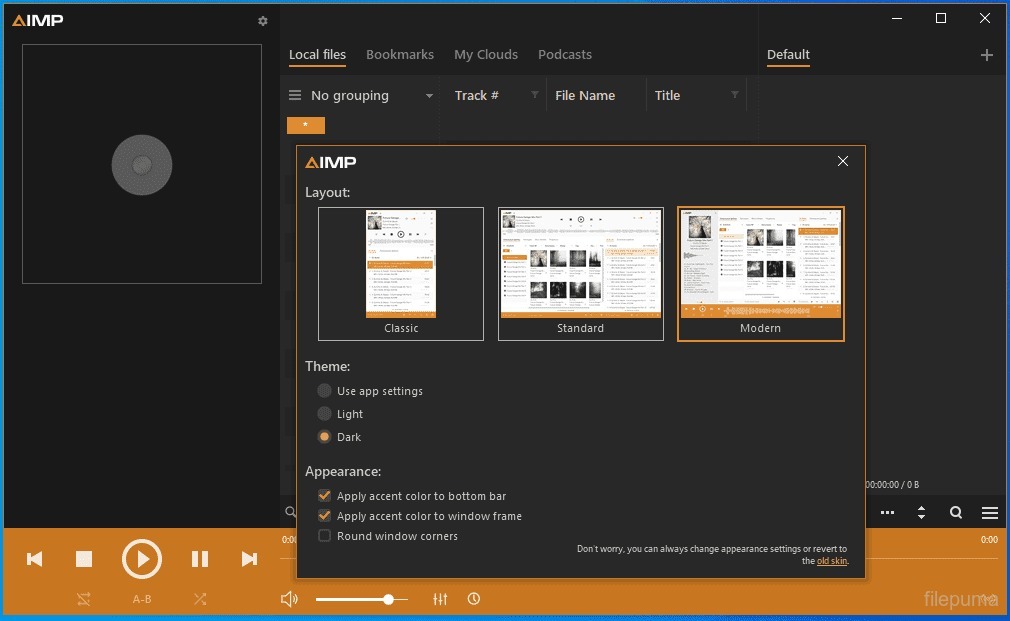


AIMPは、音楽愛好家のための包括的な機能セットを提供する、Windows用の無料で多用途なオーディオプレーヤーです。洗練された使いやすいインターフェースにより、AIMPはあらゆる種類のオーディオファイルに対してシームレスな聴取体験を提供します。
AIMPの主な機能の一つは、MP3、WAV、FLAC、AACなど、多くのオーディオ形式をサポートしている点です。これにより、AIMPはさまざまなオーディオファイルを扱うことができ、ユーザーが高品質でお気に入りの音楽を楽しめる汎用性のあるプレーヤーとなっています。
AIMPには内蔵の18バンドイコライザーが搭載されており、ユーザーはオーディオ出力を自分の好みに微調整することができます。さらに、リバーブ、フランジャー、コーラスなどのサウンドエフェクトを提供し、音声に深みと奥行きを加えてリスニング体験を向上させます。
AIMPのもう一つの注目すべき機能は、プレイリスト管理能力です。ユーザーは複数のプレイリストを作成および管理でき、他のメディアプレーヤーからプレイリストをインポートすることも可能です。プレイリストはリピート、シャッフル、クロスフェードなど異なる設定でカスタマイズでき、音楽再生を完全にコントロールすることができます。
AIMPはインターネットラジオストリーミングもサポートしており、ユーザーはプレイヤー内でお気に入りのオンラインラジオ局を聞くことができます。また、インターネットラジオストリームを録音する機能も提供しており、ユーザーはお気に入りの曲を保存してオフラインで聞くことができます。
さらに、AIMPには組み込みのタグエディターがあり、ユーザーはタイトル、アーティスト、アルバム、ジャンルなどのオーディオファイルのメタデータを編集できます。これにより、音楽コレクションの整理と管理が簡単になります。
AIMPは高品質なオーディオ再生と低システムリソース使用量で知られており、オーディオ愛好家や音楽好きの間で人気の選択肢となっています。その豊富な機能とカスタマイズ可能なオプションにより、AIMPはWindowsユーザーに包括的で楽しい音楽鑑賞体験を提供します。
主な特徴:
- さまざまな形式の高品質なオーディオ再生。
- カスタマイズ可能なインターフェースとスキンとテーマ。
- イコライザーとエフェクトによる高度な音声処理。
- スマートプレイリストによるプレイリスト管理。
- インターネットラジオとオンラインストリーミングのサポート。
- メタデータのための強力なタグ編集。
- フォーマット変換用のAudio converter.
- 内蔵オーディオ録音機能。
- カスタマイズ可能なホットキーとショートカット。
- 拡張された機能のためのプラグインと拡張機能のサポート。
新着情報
What's new
- Common: New API for plugins
- Common: DEP and ASLR support have been added
- Sound Engine: Replay Gain's "on-fly" calculation algorithm has been improved
- Sound Effects: Normalization settings have been extended
- Sound Effects: Normalization settings have been moved to separate tab
- Sound Effects: Replay Gain - added an ability to set default value for normalization
- Sound Effects: Replay Gain - added an ability to set preamp value for normalization factor
- Integration to OS: The "Add to Queue" command has been added to the context menu of Windows Explorer
- Album Arts: An ability to download album art from internet automatically (plugin for Last.fm service is used to do it for now)
- Album Arts: An ability to define album art for internet radio stations
- Album Arts: An ability to customize search options
- Playlist: The "adding files" process is now working in separate thread
- Playlist: Shuffle mode - all indexes are now stored in the playlist file
- Playlist: Shuffle algorithm has been improved - uniform playback of files from different groups, avoiding sequential playback of two consecutive files
- Playlist: The number of file access has been reduced during loading a playlist / add files process
- Skin Engine: memory consumption during skin loading has been reduced
- Skin Engine: memory consumption for skin has been reduced twice
- Audio Converter: The "Jump to target folder" button has been added
- Tag Editor: An ability to switch off grouping in the file list
- Tag Editor: Added an ability to drop files / images from internet browsers / URLs to the album art display
- Tag Editor: AIFF file format support
- Tag Editor: An ability to transliterate / change case for group of files
- Templates: macros for date modified / time modified of file were added
- Controls: support of navigation via keyboard
- Plugins: Common - added an ability to filter plugins by status
- Plugins: Common - all plug-ins are now stored in a subfolders
- Plugins: Common - support of Input plugins from Winamp has been removed because this type of plugins does not support multi threading
- Plugins: Visualizations - limit on the screen resolution has been removed for new type plugins
- Plugins: Infobar - the "show always" option has been added
- Plugins: Infobar - added an ability to select target screen
- Plugins: Last.fm - plugin now works with last.fm service directly - you no longer required installed last.fm client
- Plugins: Last.fm - added an ability to love / unlove tracks
- Plugins: Last.fm - added an ability to send the AlbumArtist field value instead of the Artist (optional)
- Plugins: Last.fm - an ability to show window with information about playable file
- Plugins: Last.fm - offline cache for100 records has been added
- Plugins: SACD - plugin for an ability to decode hi-res audio in the DSDIFF / DSF formats
他の言語で利用可能なプログラム
ユーザーレビュー
ユーザー評価
 184
184
ライセンス:
無料
要件:
Windows XP SP3/ Windows Vista/ Windows 7/ Windows 8/ Windows 8.1
言語:
Multi-languages
サイズ:
8.3MB
出版社:
更新しました:
Dec 29, 2014
クリーン
ソフト報告
最新版
旧バージョン
開発者のソフトウェア
 AIMP 5.40.2700
 iTunes (64bit) 12.13.9.1
 iTunes (32bit) 12.13.9.1
 MediaMonkey 2024.2.0.3184
 MusicBee 3.6.9403
セキュリティレベル
お使いのデバイスの潜在的な損害を避け、データとプライバシーの安全性を確保するために、私たちのチームは新しいインストールファイルがサーバーにアップロードされるかリモートサーバーにリンクされるたびに確認し、定期的にファイルをレビューしてその状態を確認または更新しています。この確認に基づいて、ダウンロード可能なファイルに対して次のセキュリティレベルを設定します。
 クリーン
クリーン
このソフトウェアプログラムはクリーンである可能性が高いです。
このソフトウェアプログラムに関連するファイルやURLを、世界の主要な60以上のウイルス対策サービスでスキャンしましたが、脅威は見つかりませんでした。また、サードパーティのソフトウェアはバンドルされていません。
 警告
警告
このプログラムは広告に支えられており、不要なサードパーティのプログラムをインストールすることを提案する場合があります。これにはツールバー、ホームページの変更、デフォルトの検索エンジンの変更、または他のパーティのプログラムのインストールが含まれる場合があります。これらは誤検出の場合があり、このソフトウェアをインストールおよび使用する際には注意するようにユーザーにアドバイスしています。
 無効
無効
このソフトウェアはもうダウンロードできません。このソフトウェアが悪意のあるものであるか、セキュリティの問題があるか、その他の理由がある可能性が非常に高いです。
報告書を提出してください
ありがとう!
あなたの報告書が送信されました。
ご依頼を確認し、適切な対応をいたします。
本報告に基づく措置について通知は行われませんのでご注意ください。ご不便をおかけして申し訳ありません。
私たちのウェブサイトを清潔で安全に保つためのご協力に感謝します。