

Keepass2.31
 無料ダウンロード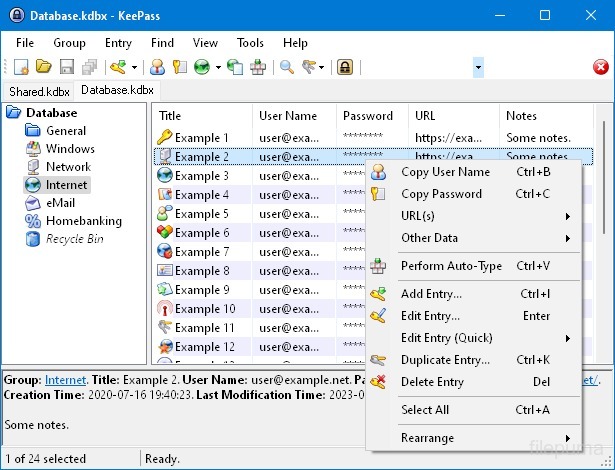


KeePassは、高度に安全で人気のあるオープンソースのパスワードマネージャーであり、安全な方法でパスワード、ユーザー名、その他の機密情報を保存および管理するために使用されます。これはDominik Reichlによって開発され、Windows、macOS、Linux、およびモバイルデバイスを含むさまざまなプラットフォームで利用可能です。
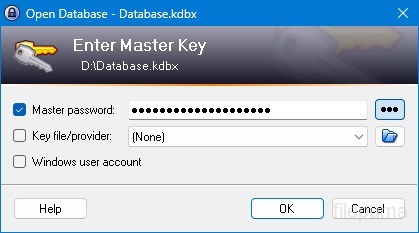
KeePassの主要な機能の一つは、その強力なセキュリティです。保存されたデータを保護するために強力な暗号化アルゴリズム(例:AES、Twofish)を採用しており、マスターパスワードを持つ許可されたユーザーのみがパスワードにアクセスできるようにしています。マスターパスワードは、暗号化されたデータベースを解除するための主要な鍵として機能します。
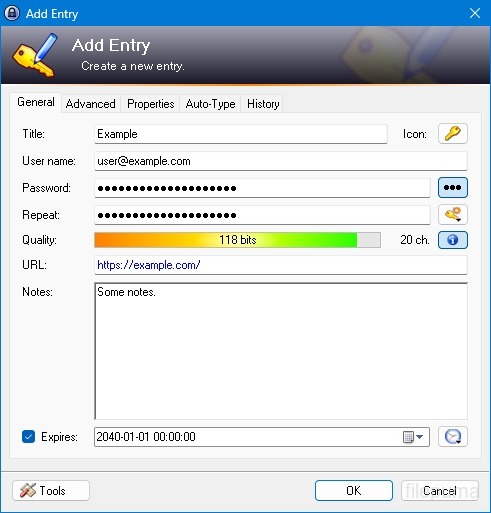
KeePassはユーザーに使いやすいインターフェースを提供し、フォルダーやカテゴリーを使用してパスワードを整理整頓することができます。さらに、パスワード生成ツールを提供しており、ユーザーが複雑で独自のパスワードを作成してセキュリティを強化するのを助けます。
このソフトウェアは、ユーザーが特定のパスワードをすばやく検索できるようにし、ウェブサイトやアプリケーションのログインフォームを自動的に入力するオートタイプなどの機能を提供します。KeePassはまた、プラグインをサポートしており、その機能を拡張し、個々のニーズに合わせてカスタマイズ可能です。
さらに、KeePassはポータブル性とアクセシビリティを強調しており、ユーザーが暗号化されたパスワードデータベースをローカルドライブ、USBドライブ、クラウドストレージなどのさまざまな記憶媒体に保存できるようにしています。これにより、ユーザーは異なるデバイスからパスワードにアクセスしつつ、安全性とプライバシーを維持することができます。
全体として、KeePassは信頼性が高く、安全なパスワード管理ソリューションであり、ユーザーが機密情報を整理して保護するのに役立ちます。
主な機能:
- 安全なパスワード保管: 安全にパスワードを保存および管理します。
- 強力な暗号化: データセキュリティのために高度な暗号化を使用します。
- マスターパスワードとキーのファイル: 強力なマスターパスワードとオプションのキー ファイルでAccessデータベースにアクセスします。
- 二要素認証 (2FA): 追加のセキュリティ層を提供します。
- オート入力機能ユーザー名とパスワードの入力を自動化します。
- パスワードジェネレーター: 強力でランダムなパスワードを作成します。
- パスワードを整理する: パスワードをグループとサブグループに分類する。
- Search & Filter特定のエントリーをすばやく見つける。
- カスタムフィールド: エントリーに追加情報を加える。
- 添付ファイル: ファイルをパスワードエントリーに安全に添付する。
- セキュリティ機能追加のセキュリティオプションを提供します。
- クロスプラットフォームさまざまなオペレーティングシステムでアクセス可能です。
- プラグインと拡張機能: 追加機能を追加して機能を拡張します。
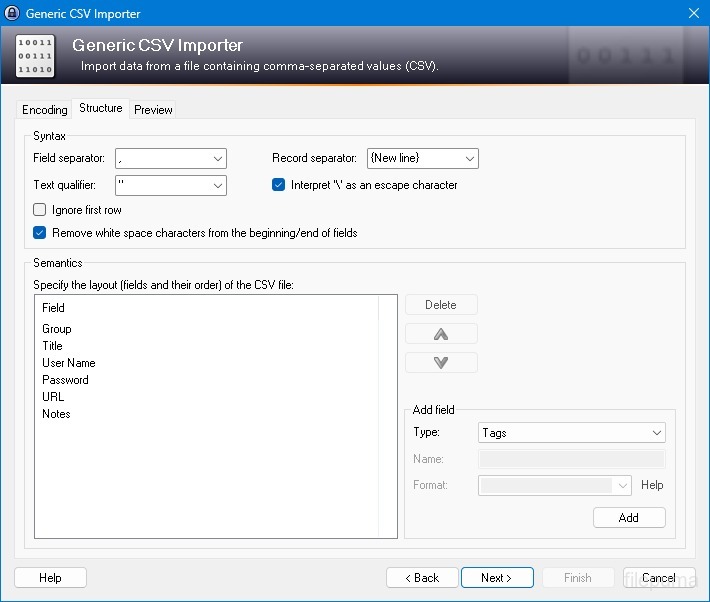
- インポート&エクスポート: パスワードを簡単にインポート/エクスポートします。
- データベース同期デバイス間でデータベースを安全に同期します。
新着情報
New Features:
- Added menu/toolbar styles, freely selectable in 'Tools' -> 'Options' -> tab 'Interface'; available styles are 'Windows 10', 'Windows 8.1', 'KeePass - Gradient', '.NET/Office - Professional' and 'System - Classic'; by default KeePass uses the style most similar to the one of the current operating system.
- Refined application icons (thanks to Victor Andreyenkov).
- Auto-Type: new target window classification method, which improves compatibility with target windows hosted within other windows (e.g. a PuTTY window within SuperPuTTY/MTPuTTY).
- Auto-Type: added workaround for the default Ctrl+Alt behavior of KiTTY variants (which differs from Windows' behavior).
- Before clearing the clipboard, KeePass now first copies a non-sensitive text into it; this ensures that no sensitive information remains in the clipboard even when clearing is prevented by the environment (e.g. when running in a virtual machine, when using a clipboard extension utility, ...).
- Added support for opening entry URLs with Internet Explorer or Google Chrome in private mode via the context menu -> 'URL(s)' -> 'Open with ... (Private)'.
- Added URL override suggestions for Internet Explorer and Google Chrome in private mode in the URL override suggestions drop-down list in the entry dialog.
- Added optional built-in global URL overrides for opening HTTP/HTTPS URLs with Internet Explorer or Google Chrome in private mode.
- Added Ctrl+K shortcut for the 'Duplicate Entry' command.
- Mozilla Bookmarks HTML import: added support for importing tags.
- Added support for exporting to Mozilla Bookmarks HTML files.
- Windows/IE favorites export: entry fields are Spr-compiled now, and entries with cmd:// URLs are now exported as LNK files.
- HTML export/printing: added support for UUIDs, added horizontal lines between entries in details mode, added background color for group headings, long field names are hyphenated now, and long field data now breaks and wraps onto the next line.
- Plugins: added possibility to configure file transactions for each URI scheme.
- Plugins: added possibility to provide custom 'Save As' dialogs more easily.
- Converted some PNG images as a workaround for a problem in Cairo/LibPNG on Unix-like systems.
- As a workaround for a weakness in Mono's FileDialog, before showing such a dialog on Unix-like systems KeePass now tries to load the file '~/.recently-used' and deletes it, if it is not a valid XML file.
- KPScript: added support for specifying the master password in encrypted form using the '-pw-enc:' command line parameter (exactly like in KeePass, compatible with the {PASSWORD_ENC} placeholder).
- KPScript: the 'Export' command now supports the optional '-GroupPath:' parameter (to export a specific group instead of the whole database).
- KPScript: the 'GetEntryString' command now supports the '-FailIfNoEntry' option.
- KPScript: added '-refx-Expires' and '-refx-Expired' entry identification parameters.
- KPScript: the 'Import' command now prints more specific error messages.
- All KeePass program binaries are now dual signed using SHA-1 and SHA-256.
Improvements / Changes:
- Auto-Type: improved keyboard layout handling when the target window changes during an auto-type process.
- Auto-Type: improved compatibility with Remote Desktop Connection client and VirtualBox.
- Improved icon recoloring.
- Improved printing of dates/times and tags.
- The password generator based on a character set now ensures that the generated password is Spr-invariant.
- Password generator based on a pattern or a custom algorithm: when a Spr-variant password is generated, a confirmation dialog for accepting this password is displayed.
- If the 'Save Database' policy prevents saving, the auto-save option is now ignored.
- Improved .NET Framework version detection.
- PLGX debugging: when the command line option '-debug' is passed and a PLGX plugin fails to compile, the output of all tried compilers is saved to a temporary file.
- Improved file transaction creation time handling on Unix-like systems.
- Improved compatibility with Mono on BSD systems.
- Enhanced PrepMonoDev.sh script for compatibility with Mono 4.x.
- Removed KeePassLibSD sub-project (a KeePass library for Pocket PC / Windows Mobile) from the main solution.
- Upgraded installer.
- Various code optimizations.
- Minor other improvements.
Bugfixes:
- When running under Mono (Linux, Mac OS X, ...), two options related to window minimization are disabled now (because they do not work properly due to a Mono bug).
他の言語で利用可能なプログラム
- Download Keepass
- Télécharger Keepass
- Herunterladen Keepass
- Scaricare Keepass
- Descargar Keepass
- Baixar Keepass
ユーザーレビュー
ユーザー評価
 26
26
ライセンス:
無料
要件:
Windows All
言語:
Multi-languages
サイズ:
2.9MB
出版社:
更新しました:
Jan 10, 2016
クリーン
ソフト報告
最新版
旧バージョン
開発者のソフトウェア
 Keepass 2.61.1
 RoboForm 10.0.0
 Dashlane 6.2632.0
 1Password 8.12.36
セキュリティレベル
お使いのデバイスの潜在的な損害を避け、データとプライバシーの安全性を確保するために、私たちのチームは新しいインストールファイルがサーバーにアップロードされるかリモートサーバーにリンクされるたびに確認し、定期的にファイルをレビューしてその状態を確認または更新しています。この確認に基づいて、ダウンロード可能なファイルに対して次のセキュリティレベルを設定します。
 クリーン
クリーン
このソフトウェアプログラムはクリーンである可能性が高いです。
このソフトウェアプログラムに関連するファイルやURLを、世界の主要な60以上のウイルス対策サービスでスキャンしましたが、脅威は見つかりませんでした。また、サードパーティのソフトウェアはバンドルされていません。
 警告
警告
このプログラムは広告に支えられており、不要なサードパーティのプログラムをインストールすることを提案する場合があります。これにはツールバー、ホームページの変更、デフォルトの検索エンジンの変更、または他のパーティのプログラムのインストールが含まれる場合があります。これらは誤検出の場合があり、このソフトウェアをインストールおよび使用する際には注意するようにユーザーにアドバイスしています。
 無効
無効
このソフトウェアはもうダウンロードできません。このソフトウェアが悪意のあるものであるか、セキュリティの問題があるか、その他の理由がある可能性が非常に高いです。
報告書を提出してください
ありがとう!
あなたの報告書が送信されました。
ご依頼を確認し、適切な対応をいたします。
本報告に基づく措置について通知は行われませんのでご注意ください。ご不便をおかけして申し訳ありません。
私たちのウェブサイトを清潔で安全に保つためのご協力に感謝します。