

SMPlayer (32bit)16.6.0
 Free Download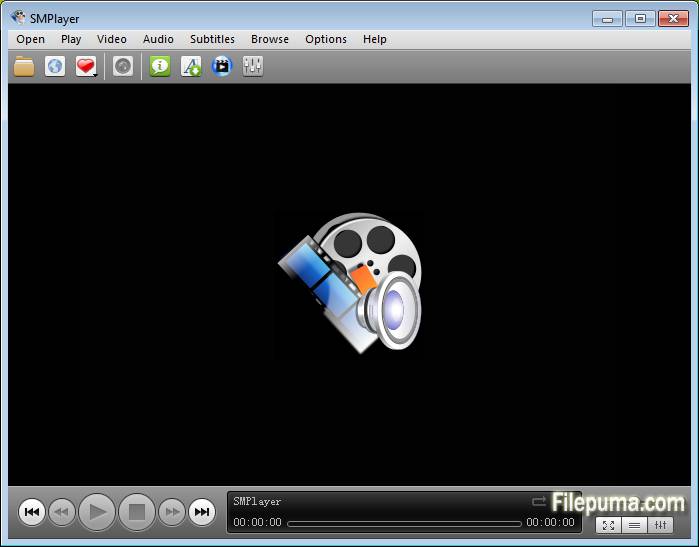


SMPlayer is a dynamic and user-friendly multimedia player that offers a seamless experience for enjoying various audio and video formats. With its intuitive interface and wide range of features, SMPlayer stands out as a top choice for media playback needs.
One of SMPlayer's key strengths is its extensive codec support, ensuring compatibility with numerous file types without the need for additional plugins or downloads. This makes it a convenient solution for users who frequently encounter diverse media formats.
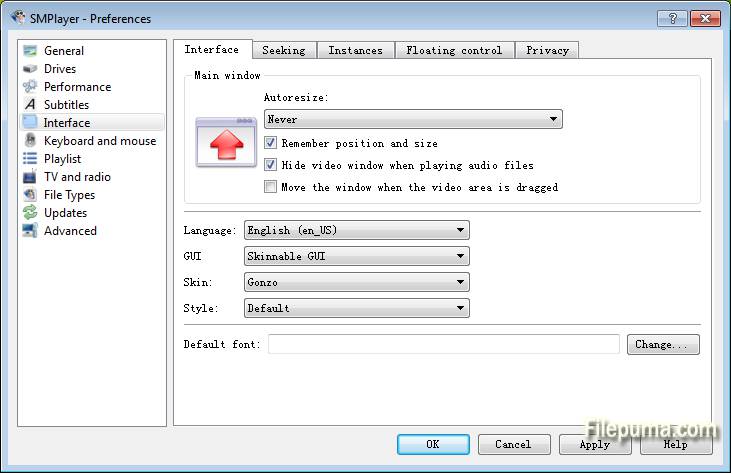
Moreover, SMPlayer's customizable interface allows users to tailor their viewing experience to suit their preferences. From adjusting playback settings to choosing different skins and themes, users have the flexibility to personalize SMPlayer to their liking.
Another notable feature of SMPlayer is its ability to resume playback from where you left off, even if you close the program or shut down your computer. This convenient functionality ensures uninterrupted enjoyment of your favorite media content.
Additionally, SMPlayer offers advanced options for fine-tuning playback, such as adjusting audio and video synchronization, applying filters, and enhancing image quality. These features cater to users who seek more control over their media playback experience.
SMPlayer stands as a reliable and versatile multimedia player, providing users with a seamless and customizable platform for enjoying their favorite audio and video content. Whether you're a casual viewer or a multimedia enthusiast, SMPlayer delivers an exceptional playback experience.
Key Features:
- Format Compatibility: Plays almost all video and audio formats without needing extra codecs.
- Subtitle Integration: Easily handles subtitles, even allowing for online subtitle downloads.
- Customizable Interface: Personalize the look with various themes and skins.
- Playback Control: Adjust playback speed, sync audio/subtitles, and loop playback.
- Audio/Video Filters: Enhance audio/video quality with built-in filters.
- Playlist Management: Create and organize playlists effortlessly.
- Playback Position Memory: Automatically resumes from the last playback position.
- YouTube Playback: Watch YouTube videos directly in the player.
What's New
Support for 2 in 1 computers with touch screens:
- SMPlayer includes now a 'tablet mode', available in the menu Options. When the option is turned on it makes some changes in the interface so that it would be easier to control SMPlayer by touching the screen.
- the size of windows and fonts are increased
- sliding vertically in the video changes the volume, sliding horizontally seeks in the video
- tapping while in fullscreen displays the floating control
- When the user changes the tablet mode in the Windows 10 action center, SMPlayer will detect it and ask if it should switch to the SMPlayer's tablet mode as well.
Send video to an external screen:
- Now it's possible to send the video to a second screen connected to the computer, while controlling the application in the computer's screen.
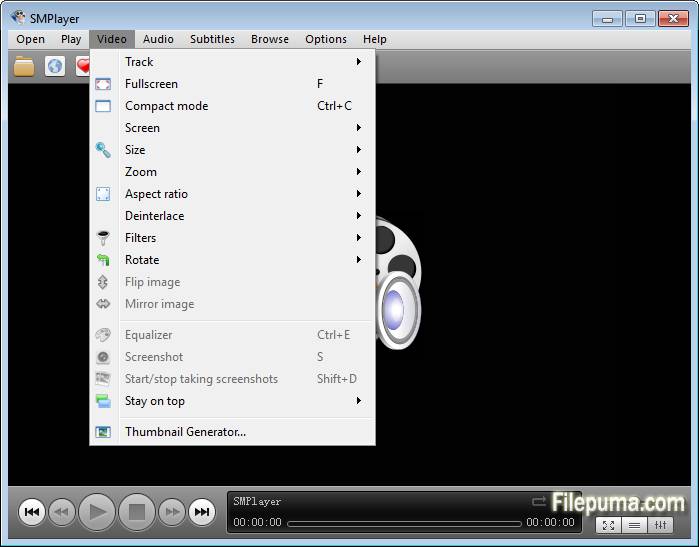
- There's a new option in the menu Video: send video to screen. It shows a submenu with all connected screens.
- One of the screens is labeled as 'primary screen', which is the computer's screen. If you send the video to another screen the video will be displayed on that screen in fullscreen mode. The SMPlayer interface will remain in the computer's screen where you can control the video (seek, change volume, subtitles, playlist, open another video, etc.) while the video is displayed on the second screen. If you send the video to the primary screen the video will be re-attached to the SMPlayer window.
- Note this feature requires the desktop to be set as 'extended'.
Support for high DPI screens:
- On high DPI (dots per inch) screens SMPlayer looked very tiny. Now the interface is automatically scaled so it looks correctly. There are also settings in Preferences -> Interface -> High DPI where you can adjust manually the scale factor or turn off this feature.
Global shortcuts:
- Now it's possible to use the media keys (play/pause, stop, volume+/-, etc.) as global shortcuts. That means that those keys will work even when SMPlayer is in the background. You can activate this option in Preferences -> Keyboard and mouse.
- Settings are remembered for online streams too:
- This means that, for example, SMPlayer can resume playback or set bookmarks on YouTube videos or other online streams (as long as they are seekable).
Other changes in SMPlayer 16.6:
- New themes: Masalla, Papirus and PapirusDark.
- Built by default with Qt 5.
Program available in other languages
- Télécharger SMPlayer (32bit)
- Herunterladen SMPlayer (32bit)
- Scaricare SMPlayer (32bit)
- ダウンロード SMPlayer (32bit)
- Descargar SMPlayer (32bit)
- Baixar SMPlayer (32bit)
User Reviews
User Rating
 5
5
License:
Free
Requirements:
Windows XP / Vista / Windows 7 / Windows 8 / Windows 10
Languages:
Multi-languages
Size:
40.2MB
Publisher:
Updated:
Jun 11, 2016
Clean
Report Software
Latest Version
Old Versions
 SMPlayer (32bit) 25.6.0
 SMPlayer (64bit) 25.6.0
 VLC Media Player (64bit) 3.0.21
 VLC Media Player (32bit) 3.0.21
 iTunes (64bit) 12.13.9.1
 Spotify 1.2.79.411
 AIMP 5.40.2700
Security Levels
To avoid any potential harm to your device and ensure the security of your data and privacy, our team checks every time a new installation file is uploaded to our servers or linked to a remote server and periodically reviews the file to confirm or update its status. Based on this checking, we set the following security levels for any downloadable files.
 Clean
Clean
It is highly likely that this software program is clean.
We scanned files and URLs associated with this software program in more than 60 of the world's leading antivirus services; no possible threats were found. And there is no third-party softwarebundled.
 Warning
This program is advertising supported and may offer to install third-party programs that are not required. These may include a toolbar, changing your homepage, default search engine, or installing other party programs. These could be false positives, and our users are advised to be careful when installing and using this software.
 Disabled
This software is no longer available for download. It is highly likely that this software program is malicious or has security issues or other reasons.
Submit a Report
Thank you!
Your report has been sent.
We will review your request and take appropriate action.
Please note that you will not receive a notification about anyaction taken dueto this report.We apologize for anyinconvenience this may cause.
We appreciate your help in keeping our website clean and safe.