

VirtualBox4.3.4
 Descarga gratuita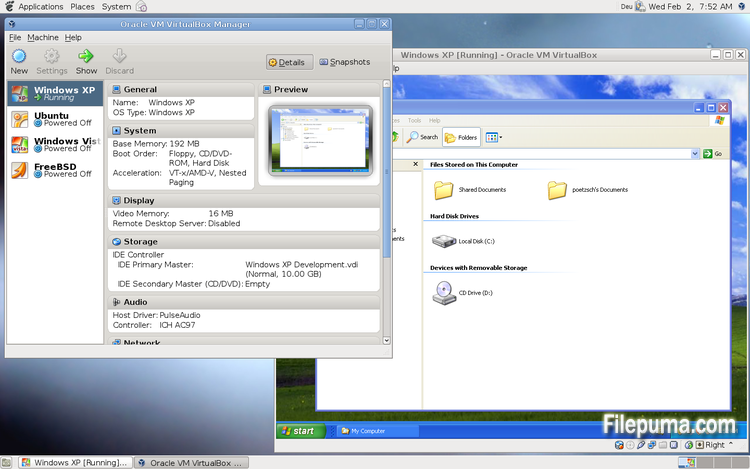
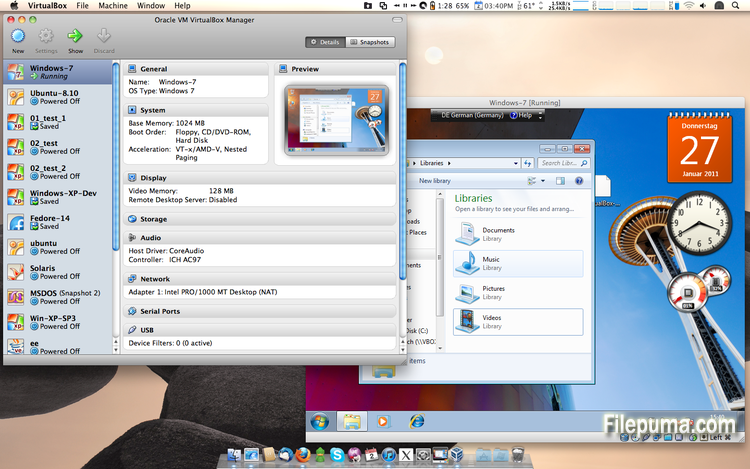
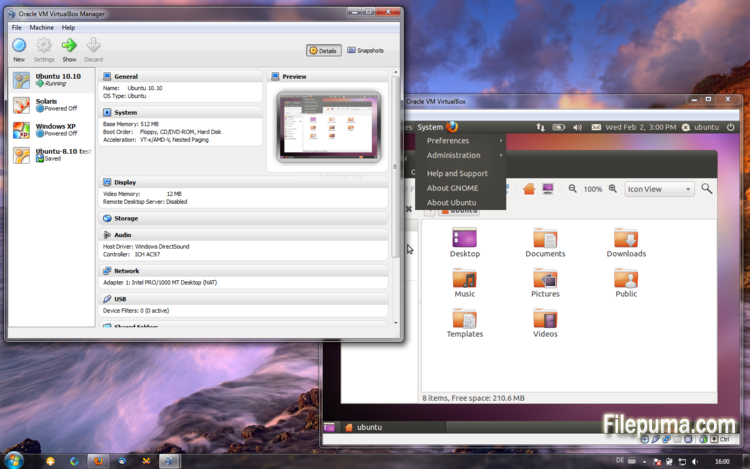


VirtualBoxes un software de virtualización gratuito y de código abierto que permite a los usuarios crear y ejecutar máquinas virtuales en sus computadoras. Con VirtualBox, los usuarios pueden instalar y ejecutar múltiples sistemas operativos simultáneamente en su computadora sin tener que crear particiones separadas o comprar hardware adicional.
Una de las principales ventajas de VirtualBox es su facilidad de uso. Es simple de instalar y configurar, incluso para aquellos que tienen poca o ninguna experiencia con la tecnología de virtualización. VirtualBox también ofrece una amplia gama de opciones de personalización, incluyendo la capacidad de ajustar la cantidad de RAM, núcleos de CPU y espacio en disco duro asignado a cada máquina virtual.
Otra gran característica de VirtualBox es su compatibilidad con una amplia gama de sistemas operativos. Los usuarios pueden instalar y ejecutar Windows, Linux, macOS y muchos otros sistemas operativos en sus máquinas virtuales. Esto lo convierte en una herramienta excelente para desarrolladores, testers de software y cualquier persona que necesite ejecutar múltiples sistemas operativos en una sola computadora.
VirtualBox también ofrece una gama de funciones avanzadas, como soporte para dispositivos USB, carpetas compartidas y adaptadores de red. Estas funciones hacen posible ejecutar software que requiere recursos de hardware o red, como enrutadores virtuales, cortafuegos y servidores.
VirtualBox es una excelente opción para cualquiera que necesite ejecutar múltiples sistemas operativos en una sola computadora. Su facilidad de uso, amplia gama de opciones de personalización y compatibilidad con muchos sistemas operativos diferentes lo convierten en una herramienta versátil y poderosa para desarrolladores, profesionales de TI y usuarios domésticos por igual.
Función clave:
- Compatibilidad multiplataforma.
- Interfaz gráfica de usuario intuitiva.
- Compatibilidad con varios sistemas operativos.
- Integración perfecta con el sistema operativo host.
- Instantáneas y clones.
- Capacidades de red.
- Soporte de dispositivos virtuales.
- Paquetes de extensión para funcionalidad adicional.
Qué hay de nuevo
- VMM: fix for a bug in the Local APIC emulation causing a BSOD when booting certain guests (4.3.0 regression; bug #12240)
- VMM: fixed loading of saved states if VT-x/AMD-V was disabled (4.3.2 regression; bug #12291)
- VMM: fixed single-stepping inside the guest for certain instructions (VT-x only; bug #10947)
- VMM: fixed a performance issue involving APIC accesses after rebooting a VM (4.3.0 regression; VT-x only; bug #12296)
- VMM: fixed TPR patching to be enabled for 32-bit guests even when the chosen guest type is 64-bit (4.3.0 regression; AMD-V only)
- VMM: fixed occasional VINF_EM_TRIPLE_FAULT errors on hosts without the unrestricted guest execution feature (bug #12198)
- GUI: don't bother the user with the BPP warning if no Guest Additions are installed
- GUI: fixed machine-window paint artifacts on VM reboot / guest-screen resize
- GUI: make sure the assigned license and description are attached to the exported appliance
- GUI: fixed bugs in close VM action restrictions handling (bug #12333)
- GUI: fixed incorrect wizards text colors for some unusual look and feel styles (bug #11743)
- GUI: should restore seamless mode as soon as possible after VM reboot or shutdown
- GUI: fixes for medium enumeration
- GUI: the OS X hot corners were not accessible while a VirtualBox VM is running (Mac OS X hosts only; bug #4139)
- GUI: fixed an old bug which bared the host from cleanly shutdown / reboot if the VM selector window is open (Mac OS X hosts only; bug #8254)
- Host-only Networking: fixed creating of host-only network interfaces (4.3.0 regression; bug #12182)
- NAT: don't run into an infinite loop in case the host cannot access any DNS server (4.3.0 regression; bug #12300)
- NAT: don't re-connect the cable if the DNS information changes and the cable was disconnected before (4.3.0 regression; bug #12225)
- NAT: fixed several issues with automatically starting / terminating of NAT networks on VM start / stop and configuration changes
- VBoxNetDHCP: don't block prevent VBoxSVC from terminating (bug #12264)
- 2D Video acceleration: fix crashes on presentation mode switches (bug #9194)
- BusLogic: allow to run VMs with more than one BusLogic SCSI controller enabled
- Keyboard: fixed a VM crash if a VM was resumed from a saved state where at least one key was pressed (bug #11289)
- VBoxSVC: fixed a heap corruption under certain conditions (4.3.0 regression)
- VBoxSVC: fixed a race leading to a hang during initialization (bug #12349)
- OVF: fixed import logic for OVF appliances containing multiple VMs
- OVF: improved logic for finding an appropriate image format during OVF import
- API: block the removal of the current snapshot if it has child snapshots (only relevant for VMs without snapshottable hard disks, their presence always prevented removal), which resulted in VM configuration corruption
- API: mark VM configurations with snapshots but without current snapshot as inaccessible, as this combination is nonsense
- API: fixed information for some automatically generated events (only with XPCOM, Windows host was not affected), which caused errors when getting some of the attributes over the webservice (bug #12379)
- SDK: extended the functionality coverage for the C bindings
- Guest Control: various bug fixes and improved VBoxManage help (bugs #8072, #11044, #12336, #12338, #12346, #12371)
- Windows hosts: another attempt to fix the massive DPC latency (bug #6242)
- Windows host installer: make registering file extensions optional, contributed by Tal Aloni (bug #8009)
- Mac OS X hosts: properly sign the kernel extensions for Mavericks hosts (bug #12256)
- Mac OS X hosts: fixed a bug where the VirtualBox dock icon was not properly removed from the dock after a VM terminated preventing Mavericks hosts from shutting down (bug #12241)
- Mac OS X hosts: fixed minor installer issue (bug #12275)
- Linux hosts / guests: Linux 3.13 compile fixes (bug #12358)
- Linux guests: build the vboxvideo kernel module correctly on OL/RHEL 6.1 guests (bug #11996)
- Linux guests: make 3D work on Slackware 14.1 (bug #12320 comments 3 and 4)
- Guest Additions/3D: fixed an occasional dead-lock (bug #12319)
- Windows Additions/3D: fixed possible memory leaking (bug #12228)
- Windows Additions/XPDM: use separate tables containing valid video modes for each virtual monitor
- Windows Additions: fixed automatic logins for Vista and newer Windows guests (bug #12332)
Programa disponible en otros idiomas
- Download VirtualBox
- Télécharger VirtualBox
- Herunterladen VirtualBox
- Scaricare VirtualBox
- ダウンロード VirtualBox
- Baixar VirtualBox
Reseñas de usuarios
Calificación del usuario
 101
101
Licencia:
Gratis
Requisitos:
Windows All
Idiomas:
Multi-languages
Tamaño:
101MB
Editor:
Actualizado:
Dec 2, 2013
Limpio
Informa del software
Última versión
Versiones antiguas
Software del desarrollador
 VirtualBox 7.2.4
 Adobe Air 51.2.2.6
 Java Runtime Environment (32bit) 8 Update 471
 Java Runtime Environment (64bit) 8 Update 471
 Java Development Kit (64bit) 8 Update 471
 Python (64bit) 3.14.2
Niveles de seguridad
Para evitar cualquier daño potencial a su dispositivo y garantizar la seguridad de sus datos y privacidad, nuestro equipo verifica cada vez que se sube un nuevo archivo de instalación a nuestros servidores o se vincula a un servidor remoto y revisa periódicamente el archivo para confirmar o actualizar su estado. Basándonos en esta verificación, establecemos los siguientes niveles de seguridad para cualquier archivo descargable.
 Limpio
Es muy probable que este programa de software esté limpio.
Hemos escaneado los archivos y las URL asociadas con este programa de software en más de 60 de los principales servicios antivirus del mundo; no se encontraron posibles amenazas. Y no hay software de terceros incluido.
 Advertencia
Este programa está soportado por publicidad y puede ofrecer instalar programas de terceros que no son necesarios. Estos pueden incluir una barra de herramientas, cambiar su página de inicio, motor de búsqueda predeterminado, o instalar otros programas de terceros. Estos podrían ser falsos positivos, y se recomienda a nuestros usuarios que tengan cuidado al instalar y usar este software.
 Discapacitado
Este software ya no está disponible para su descarga. Es muy probable que este programa de software sea malicioso o tenga problemas de seguridad u otros motivos.
Enviar un informe
¡Gracias!
Tu informe ha sido enviado.
Revisaremos su solicitud y tomaremos las medidas adecuadas.
Tenga en cuenta que no recibirá una notificación sobre cualquier acción tomada debido a este informe. Nos disculpamos por cualquier inconveniente que esto pueda causar.
Agradecemos su ayuda para mantener nuestro sitio web limpio y seguro.