

Total Commander8.50
 آزمایش رایگان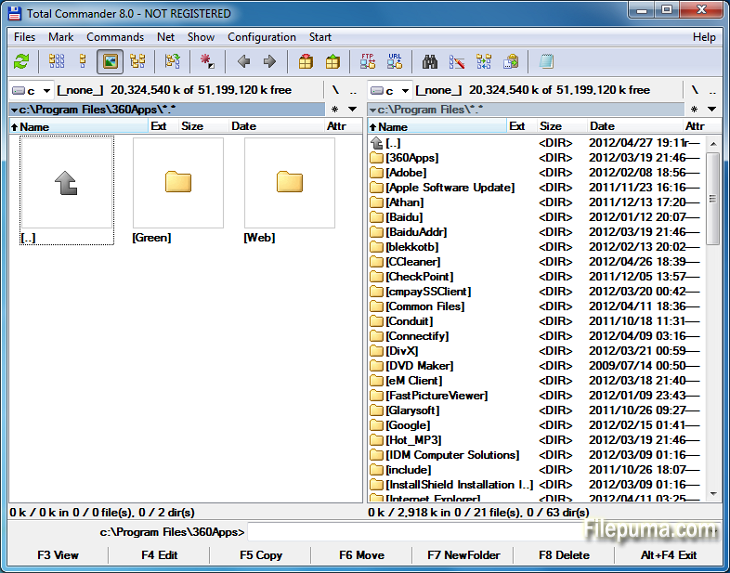


Total Commanderیک نرمافزار مدیریت فایل قدرتمند است که عملیات فایل را در سیستمعاملهای ویندوز سادهتر و بهبود میبخشد. با رابط کاربری دوستانه و ویژگیهای فراوان، این نرمافزار محبوبیت زیادی در میان کاربران در سراسر جهان بهدست آورده است.
این فایل منیجر یک طرح دو پنل ارائه میدهد که نمایش در کنار هم پوشهها و فایلها را فراهم میکند و انتقال فایلها بین دایرکتوریها را آسان میکند. این نرمافزار از انواع فرمتهای آرشیو مانند ZIP، RAR، و 7-Zip پشتیبانی میکند و استخراج و فشردهسازی فایلها را بدون مشکل انجام میدهد.
یکی از ویژگیهای برجسته Total Commander پشتیبانی گسترده از افزونهها است. کاربران میتوانند با افزودن افزونههای متعدد برای قابلیتهای اضافی مانند یکپارچهسازی ذخیرهسازی ابری، مدیریت چندرسانهای و مقایسه پیشرفته فایل، کارکرد را گسترش دهند.
نرمافزار همچنین در گزینههای قابل تنظیم خود برجسته است و به کاربران امکان میدهد رابط و کلیدهای میانبر را بر اساس ترجیحات خود شخصیسازی کنند. ابزارهای جستجو و فیلتر کارآمد آن به یافتن سریع فایلها کمک میکنند و زمان و تلاش را صرفهجویی میکنند.
توتال کامندر بر امنیت و قابلیت اطمینان تأکید دارد و اطمینان حاصل میکند که عملیاتهای حساس به صورت ایمن انجام شوند تا از حذف یا بازنویسی تصادفی فایلها جلوگیری شود.
در نهایت، Total Commander یک ابزار مدیریت فایل مطمئن و همهکاره است که مدیریت فایلها را ساده میکند، بهرهوری را افزایش میدهد و تجربه کاربری روانی ارائه میدهد. چه کاربر مبتدی باشید و چه پیشرفته، Total Commander یک ابزار ضروری برای هر کسی است که به دنبال یک راهحل کارآمد و قدرتمند برای مدیریت فایلهاست.
متن خالی است، لطفاً جملهای برای ترجمه ارائه دهید.
ویژگیهای کلیدی:
- رابط کاربری دو پنلی برای مدیریت آسان فایلها.
- مرور تب دار برای پیمایش سریع.
- رابط کاربری قابل تنظیم.
- پشتیبانی داخلی برای مدیریت آرشیوها.
- پشتیبانی FTP و شبکه برای مدیریت فایل های از راه دور.
- ابزار قدرتمند تغییر نام چندگانه.
- هماهنگسازی دایرکتوری برای مقایسه و هماهنگسازی فایلها.
- جستجوی سریع برای یافتن کارآمد فایل.
- پشتیبانی از Plugin برای عملکرد گستردهتر.
- میانبرهای فراوان صفحه کلید برای عملیات سریع.
چه خبر؟
File operations:
- F5 copy: First copy all files where the user doesn't need to be asked and skip all with errors, ask at the end
- F5 copy: Option to verify files after copying them.
- F5 copy: Option to keep paths relative to current folder while in branch view (Ctrl+B)
- Select and copy related files, e.g. *.jpg > crw*.cr2 selects/copies raw files only if there is a related .jpg file
- F8 Delete: Only warn at the end if folders couldn't be deleted
- F8 Delete: Always use new delete method when VistaDelete isn't set in wincmd.ini, but show our own delete confirmation dialog if the system dialog is disabled
- Support unpacking of more archive formats: 7zip, new RAR5 format, as well as -lh6- and -lh7- (LHA)
- RAR with encrypted file names: Show archive content after entering password
- Pack/unpack files: Option to remember last entered password until TC is minimized, Windows goes to standby, or the screen saver starts
- Alt+F5 pack: New option to leave out the names of the selected folders when packing each folder to a separate archive
- New wincmd.ini options CopyLinks and IgnoreLinks to handle file system links
- FTP/file system plugins: When editing a file with F4, the file will automatically be re-uploaded when saved in the edfitor. No need to close the editor any more. Change via Edit/View options.
- Support for touch screen devices: Tap on icons to select files (configurable), long tap to open context menu
- Support for high resolution screens (high DPI)
- Drive drop-down list (Alt+F1/Alt+F2): Show links to "My Computer" and "My Documents" Configurable via. ShowExtraDrives in wincmd.ini
- Drive drop-down list (Alt+F1/Alt+F2): Open context menu directly in the list without choosing a drive first
- Show exclamation mark to the left of some options as a warning, e.g. that files may not go where the user expects them to go, like during copying from branch view, or when packing and unpacking
- Show file size and last modified time also in virtual folders like connected MTP devices like Android phones/tablets
- Button bar: Support multiple internal and/or user-defined commands on a single button e.g. cm_SelectAll,cm_Copy
- Progress dialog: Show number of files/bytes in more functions. Switch to files/bytes remaining by clicking on the numbers
- Show thumbnails in virtual folders like libraries
- Option to remember position of background transfer manager in system menu (click on top-left icon)
- Improved background copy dialog: Show number of copied and selected files and bytes, add button "Foreground"
- Search for text supports any combination of ANSI, ASCII, UTF-16, UTF-8 Unicode and office XML/EPUB at the same time
- Skip a folder by clicking on its name in the status line (with confirmation). Also allows to just pause the search
- Open in separate process via Alt+Shift+F7, so TC can still be used during the search
- "Feed to listbox" also when searching in archives, on FTP servers and file system plugins
- Search for duplicate files: Search by plugin fields, e.g. name parts, file extension etc.
- Search for duplicate files, Feed to listbox: New dialog box to select files inside the groups of duplicates, e.g. by newest, oldest etc.
- Compare by content: "Resync comparison from here" now also works after editing the files
- Create/Verify CRC checksums: Also support SHA256 and SHA512 formats
- Show hidden/system files now split into separate options for hidden and system
- Option to get more items in various history lists, set via wincmd.ini: HistoryLen for directory history, OldCmdLineCount for command line. MaxItemsInComboBox for comboboxes in F7 New Folder, Alt+F7 Search, Num+ select files etc.
- Lister, right click menu: Directly search for selected text via Google in default browser (configurable)
برنامه در زبانهای دیگر در دسترس است
- Download Total Commander
- Télécharger Total Commander
- Herunterladen Total Commander
- Scaricare Total Commander
- ダウンロード Total Commander
- Descargar Total Commander
- Baixar Total Commander
بررسیهای کاربران
امتیاز کاربر
 29
29
مجوز:
آزمایش رایگان
نیازمندیها:
Windows All
زبانها:
Multi-languages
اندازه:
3.5MB
ناشر:
بهروزرسانیشده:
Feb 19, 2014
تمیز
نرمافزار گزارشگیری
آخرین نسخه
نسخههای قدیمی
نرمافزار توسعهدهنده
 Total Commander 11.56
 CrystalDiskInfo 9.7.2
 Update Detector 6.64.0.64
 Defraggler 2.22.995
 Recuva 1.54.120
 EaseUS Data Recovery Wizard Free 19.4.0
سطحهای امنیتی
برای جلوگیری از هر گونه آسیب بالقوه به دستگاه شما و اطمینان از امنیت دادهها و حریم خصوصیتان، تیم ما هر بار که یک فایل نصب جدید به سرورهای ما بارگذاری میشود یا به یک سرور از راه دور متصل میشود، آن را بررسی کرده و بهطور دورهای وضعیت فایل را تایید یا بهروزرسانی میکند. بر اساس این بررسی، سطوح امنیتی زیر را برای هر فایل قابل دانلود تعیین میکنیم.
 تمیز
تمیز
بسیار احتمال دارد که این نرمافزار پاک باشد.
ما فایلها و URLهای مرتبط با این نرمافزار را در بیش از ۶۰ سرویس آنتیویروس برتر جهان اسکن کردیم؛ هیچ تهدید احتمالی پیدا نشد. و هیچ نرمافزار شخص ثالثی همراه نیست.
 هشدار
هشدار
این برنامه از تبلیغات حمایت میکند و ممکن است پیشنهاد نصب برنامههای شخص ثالثی را ارائه دهد که الزامی نیستند. اینها میتوانند شامل نوارابزار، تغییر صفحهاصلی شما، موتور جستجوی پیشفرض یا نصب برنامههای دیگر باشند. این موارد ممکن است مثبت کاذب باشند و به کاربران ما توصیه میشود در هنگام نصب و استفاده از این نرمافزار احتیاط کنند.
 معلول
معلول
این نرمافزار دیگر برای دانلود در دسترس نیست. احتمالاً این برنامه نرمافزاری مخرب است یا دارای مشکلات امنیتی یا دلایل دیگر میباشد.
گزارش را ارائه دهید
ممنون!
گزارش شما ارسال شده است.
ما درخواست شما را بررسی کرده و اقدام مناسب را انجام خواهیم داد.
لطفاً توجه داشته باشید که شما هیچگونه اطلاعیهای در مورد هر اقدام انجام شده به دلیل این گزارش دریافت نخواهید کرد. ما از هرگونه ناراحتی که ممکن است ایجاد شود، عذرخواهی میکنیم.
ما از کمکتان در حفظ تمیزی و امنیت وبسایتمان سپاسگزاریم.