

Total Commander8.50
 無料トライアル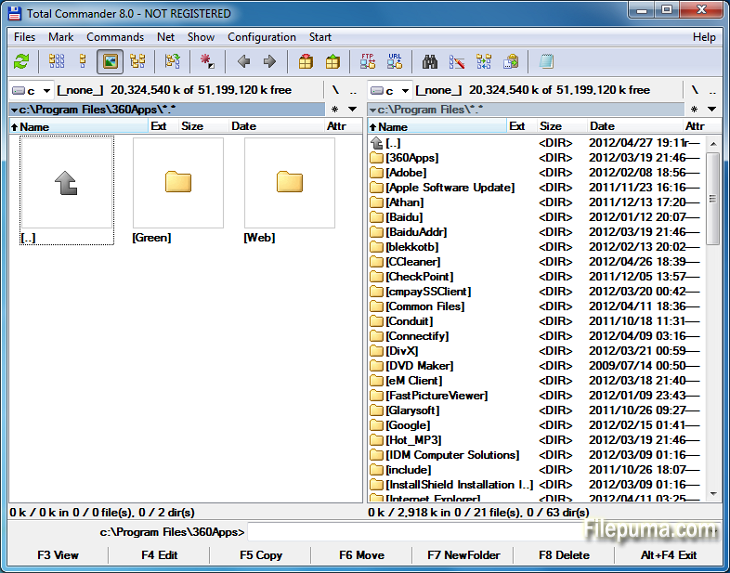


トータルコマンダーは、Windowsオペレーティングシステム上でファイル操作を簡素化し強化する強力なファイル管理ソフトウェアです。ユーザーフレンドリーなインターフェースと多くの機能を備えており、世界中のユーザーから非常に人気を集めています。
このファイルマネージャーはデュアルパネルレイアウトを提供し、フォルダとファイルを並べて表示でき、ディレクトリ間でファイルを簡単にドラッグアンドドロップできます。ZIP、RAR、7-Zipなどのさまざまなアーカイブ形式に対応しており、ファイルの圧縮や解凍をスムーズに行えます。
Total Commanderの主なハイライトの1つは、その豊富なプラグインサポートです。ユーザーはクラウドストレージ統合、マルチメディア処理、高度なファイル比較などの追加機能のために多数のプラグインを追加して機能を拡張できます。
そのソフトウェアはカスタマイズ可能なオプションにも優れており、ユーザーがインターフェースやホットキーを好みに応じてパーソナライズすることができます。効率的な検索とフィルター機能により、ファイルの迅速な検索が可能で、時間と手間を節約します。
Total Commanderは、重要な操作が安全に実行され、誤ってファイルが削除されたり上書きされたりしないようにすることで、安全性と信頼性を強調しています。
結論として、Total Commanderは信頼性が高く多用途なファイル管理ツールであり、ファイル処理を簡素化し、生産性を向上させ、スムーズなユーザー体験を提供します。初心者であっても上級者であっても、効率的で強力なファイル管理ソリューションを求める人にとって、Total Commanderは必携のユーティリティです。
すみませんが、翻訳するための文章を提供してください。
主な特徴:
- 簡単なファイル管理のためのデュアルパネルインターフェース。
- 素早いナビゲーションのためのタブブラウジング。
- カスタマイズ可能なユーザーインターフェース。
- アーカイブの処理をサポートするビルトイン機能。
- FTPおよびネットワークサポートによるリモートファイル管理。
- 強力なマルチリネームツール。
- ファイル比較と同期のためのディレクトリ同期。
- 効率的なファイル検索のためのクイックサーチ。
- プラグインサポートによる機能拡張。
- 迅速な操作のための豊富なキーボードショートカット。
新着情報
File operations:
- F5 copy: First copy all files where the user doesn't need to be asked and skip all with errors, ask at the end
- F5 copy: Option to verify files after copying them.
- F5 copy: Option to keep paths relative to current folder while in branch view (Ctrl+B)
- Select and copy related files, e.g. *.jpg > crw*.cr2 selects/copies raw files only if there is a related .jpg file
- F8 Delete: Only warn at the end if folders couldn't be deleted
- F8 Delete: Always use new delete method when VistaDelete isn't set in wincmd.ini, but show our own delete confirmation dialog if the system dialog is disabled
- Support unpacking of more archive formats: 7zip, new RAR5 format, as well as -lh6- and -lh7- (LHA)
- RAR with encrypted file names: Show archive content after entering password
- Pack/unpack files: Option to remember last entered password until TC is minimized, Windows goes to standby, or the screen saver starts
- Alt+F5 pack: New option to leave out the names of the selected folders when packing each folder to a separate archive
- New wincmd.ini options CopyLinks and IgnoreLinks to handle file system links
- FTP/file system plugins: When editing a file with F4, the file will automatically be re-uploaded when saved in the edfitor. No need to close the editor any more. Change via Edit/View options.
- Support for touch screen devices: Tap on icons to select files (configurable), long tap to open context menu
- Support for high resolution screens (high DPI)
- Drive drop-down list (Alt+F1/Alt+F2): Show links to "My Computer" and "My Documents" Configurable via. ShowExtraDrives in wincmd.ini
- Drive drop-down list (Alt+F1/Alt+F2): Open context menu directly in the list without choosing a drive first
- Show exclamation mark to the left of some options as a warning, e.g. that files may not go where the user expects them to go, like during copying from branch view, or when packing and unpacking
- Show file size and last modified time also in virtual folders like connected MTP devices like Android phones/tablets
- Button bar: Support multiple internal and/or user-defined commands on a single button e.g. cm_SelectAll,cm_Copy
- Progress dialog: Show number of files/bytes in more functions. Switch to files/bytes remaining by clicking on the numbers
- Show thumbnails in virtual folders like libraries
- Option to remember position of background transfer manager in system menu (click on top-left icon)
- Improved background copy dialog: Show number of copied and selected files and bytes, add button "Foreground"
- Search for text supports any combination of ANSI, ASCII, UTF-16, UTF-8 Unicode and office XML/EPUB at the same time
- Skip a folder by clicking on its name in the status line (with confirmation). Also allows to just pause the search
- Open in separate process via Alt+Shift+F7, so TC can still be used during the search
- "Feed to listbox" also when searching in archives, on FTP servers and file system plugins
- Search for duplicate files: Search by plugin fields, e.g. name parts, file extension etc.
- Search for duplicate files, Feed to listbox: New dialog box to select files inside the groups of duplicates, e.g. by newest, oldest etc.
- Compare by content: "Resync comparison from here" now also works after editing the files
- Create/Verify CRC checksums: Also support SHA256 and SHA512 formats
- Show hidden/system files now split into separate options for hidden and system
- Option to get more items in various history lists, set via wincmd.ini: HistoryLen for directory history, OldCmdLineCount for command line. MaxItemsInComboBox for comboboxes in F7 New Folder, Alt+F7 Search, Num+ select files etc.
- Lister, right click menu: Directly search for selected text via Google in default browser (configurable)
他の言語で利用可能なプログラム
- Download Total Commander
- Télécharger Total Commander
- Herunterladen Total Commander
- Scaricare Total Commander
- Descargar Total Commander
- Baixar Total Commander
ユーザーレビュー
ユーザー評価
 29
29
ライセンス:
無料トライアル
要件:
Windows All
言語:
Multi-languages
サイズ:
3.5MB
出版社:
更新しました:
Feb 19, 2014
クリーン
ソフト報告
最新版
旧バージョン
開発者のソフトウェア
 Total Commander 11.56
 CrystalDiskInfo 9.7.2
 Update Detector 6.64.0.64
 Defraggler 2.22.995
 Recuva 1.54.120
 EaseUS Data Recovery Wizard Free 19.4.0
セキュリティレベル
お使いのデバイスの潜在的な損害を避け、データとプライバシーの安全性を確保するために、私たちのチームは新しいインストールファイルがサーバーにアップロードされるかリモートサーバーにリンクされるたびに確認し、定期的にファイルをレビューしてその状態を確認または更新しています。この確認に基づいて、ダウンロード可能なファイルに対して次のセキュリティレベルを設定します。
 クリーン
クリーン
このソフトウェアプログラムはクリーンである可能性が高いです。
このソフトウェアプログラムに関連するファイルやURLを、世界の主要な60以上のウイルス対策サービスでスキャンしましたが、脅威は見つかりませんでした。また、サードパーティのソフトウェアはバンドルされていません。
 警告
警告
このプログラムは広告に支えられており、不要なサードパーティのプログラムをインストールすることを提案する場合があります。これにはツールバー、ホームページの変更、デフォルトの検索エンジンの変更、または他のパーティのプログラムのインストールが含まれる場合があります。これらは誤検出の場合があり、このソフトウェアをインストールおよび使用する際には注意するようにユーザーにアドバイスしています。
 無効
無効
このソフトウェアはもうダウンロードできません。このソフトウェアが悪意のあるものであるか、セキュリティの問題があるか、その他の理由がある可能性が非常に高いです。
報告書を提出してください
ありがとう!
あなたの報告書が送信されました。
ご依頼を確認し、適切な対応をいたします。
本報告に基づく措置について通知は行われませんのでご注意ください。ご不便をおかけして申し訳ありません。
私たちのウェブサイトを清潔で安全に保つためのご協力に感謝します。