

WinPatrol29.0.2013
 無料ダウンロード


新着情報
Power to the People
Your comments and suggestions have helped create one of the most exciting new versions in recent years. Over the years WinPatrol had grown with the ability to detect a large range of internal changes within Windows. In the process, WinPatrol lost its easy to use feel that encouraged you to tell your friends and family to download our program. Version 29, built on your feedback, returns WinPatrol to it's roots and will have you blogging and tweeting by the end of the week.
One complaint I've heard, especially from new users, is the volume of alert messages when there is a new program install or malware attack. Over the years, the number of critical locations monitored by WinPatrol has grown but it?s also source of frustration. While everyone appreciates WinPatrol alerting them to an infiltration, the number of locations we reveal combined with numerous malware pop ups is overwhelming.
Installing a legitimate program will typically cause new entries in the Startup Programs, an IE Helper or two and multiple Services. A malware attack may create 10 times the changes all generating individual warnings from WinPatrol. Instead of having to respond to each change most of us would rather just have everything fixed with a single action. That?s WinPatrol v29.
The new version will save users from as much frustration as possible and includes new options when unexpected changes occur. Based on a single user response, WinPatrol will evaluate a response to other immediate changes without requiring extensive user interaction.
More Options when you need them.
WinPatrol v29 has added new clickable links on our alert screens. Open Folder and Properties features are currently available by right-clicking on a filename in our main tabbed interface. More than one user has pointed out how useful this information would be when an initial alert appears. Disable is also available on our main interface and now can be used immediately to tell WinPatrol you never want this change to occur.
WinPatrol Warning for Adobe Acrobat
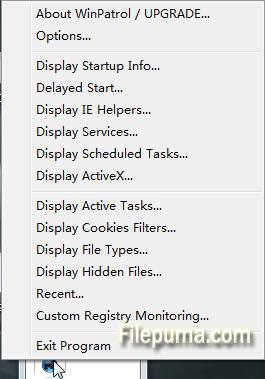
Hopefully, the Exit WinPatrol won?t be needed now that we?ve added our other new feature but based on the panic I sometimes read I thought folks would appreciate an emergency exit.
Simple Question: Did I install this program?
My goal is to offer a single alert with all the information you need to know if you?ve installed a useful program or you?re under attack. You'll receive a single screen with information to help you decide. Were you installing something new? Were you visiting new websites? Did you click on a link and wish you hadn't? If you know the answer WinPatrol will fill in the blanks and let you decide if it's safe to continue or if you've been attacked by malware that found a hole in some software already on your computer.
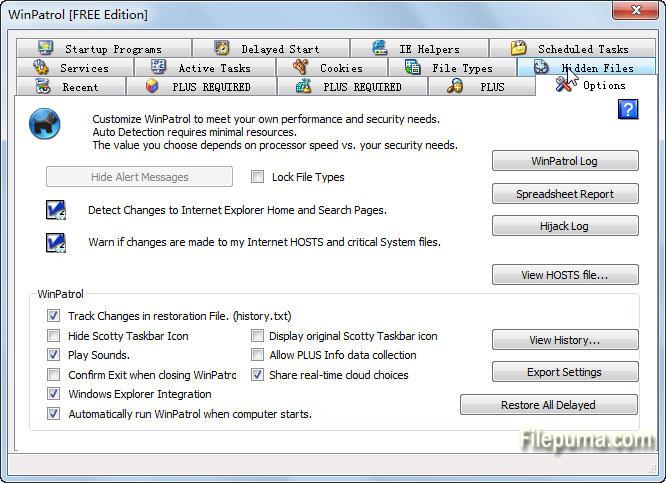
Naturally, this new feature can be turned off but it will default to the more friendly, and usable status. If you'd like to see messages for every change uncheck the "Suppress alert" box under Options, "Hide Alerts". This power feature is available for WinPatrol PLUS user. Feedback indicates that most people don't need to know every detail. They just want it fixed. Any changes will continue to be stored under the History button so any unwanted change can be restored.
I hope this enhancement will be welcomed and perhaps generate interest again from past WinPatrol fans. I am confident it will be accepted by anyone new to WinPatrol and allow them to continue using WinPatrol so they can discover all its power.
Additions Enhancements and Bug Fixes
Added New Features to Start, IE Helper and Service Alerts
- Added Properties information directly from Windows
- Added Open Folder launching Windows File Explorer to allow user direct access to new file.
- Added Exit Windows emergency exit in case new users are confused or had WinPatrol installed without their knowledge.
- Include Disable feture to new Startup Program alert message. This tells WinPatrol to keep track of this file and always remove it anytime it is put back into the startup list.
- Reduce font size for dialogs that display long path names.
- Confirm MS Shell Dlg font is used to support international system fonts
- Adjust fonts to provide better handling when resizing main interface
- Change default position of alert message to upper right corner to be less obstuctive
- Detect signature file updates without warning McAfee users every day.
- Confirm all types of changes are checked at the same time when any single change occurs.
- Allow suppression of multiple alerts during Real-time Infiltration Detection
他の言語で利用可能なプログラム
- Download WinPatrol
- Télécharger WinPatrol
- Herunterladen WinPatrol
- Scaricare WinPatrol
- Descargar WinPatrol
- Baixar WinPatrol
ユーザーレビュー
ユーザー評価
 63
63
ライセンス:
無料
要件:
Windows XP / Vista/ Windows 7/ Windows 8/ XP 64/ Vista 64/ Windows 7 64/ Windows 8 64
言語:
English
サイズ:
890KB
出版社:
更新しました:
Oct 20, 2013
クリーン
ソフト報告
最新版
旧バージョン
開発者のソフトウェア
 WinPatrol 35.5.2017.8
 Spybot - Search & Destroy 2.9.85.5
 SuperAntiSpyware 10.0.1288
 RogueKiller 16.8.0.0
 Kaspersky Anti-Virus 17.0.0.611
セキュリティレベル
お使いのデバイスの潜在的な損害を避け、データとプライバシーの安全性を確保するために、私たちのチームは新しいインストールファイルがサーバーにアップロードされるかリモートサーバーにリンクされるたびに確認し、定期的にファイルをレビューしてその状態を確認または更新しています。この確認に基づいて、ダウンロード可能なファイルに対して次のセキュリティレベルを設定します。
 クリーン
クリーン
このソフトウェアプログラムはクリーンである可能性が高いです。
このソフトウェアプログラムに関連するファイルやURLを、世界の主要な60以上のウイルス対策サービスでスキャンしましたが、脅威は見つかりませんでした。また、サードパーティのソフトウェアはバンドルされていません。
 警告
警告
このプログラムは広告に支えられており、不要なサードパーティのプログラムをインストールすることを提案する場合があります。これにはツールバー、ホームページの変更、デフォルトの検索エンジンの変更、または他のパーティのプログラムのインストールが含まれる場合があります。これらは誤検出の場合があり、このソフトウェアをインストールおよび使用する際には注意するようにユーザーにアドバイスしています。
 無効
無効
このソフトウェアはもうダウンロードできません。このソフトウェアが悪意のあるものであるか、セキュリティの問題があるか、その他の理由がある可能性が非常に高いです。
報告書を提出してください
ありがとう!
あなたの報告書が送信されました。
ご依頼を確認し、適切な対応をいたします。
本報告に基づく措置について通知は行われませんのでご注意ください。ご不便をおかけして申し訳ありません。
私たちのウェブサイトを清潔で安全に保つためのご協力に感謝します。