

Total Commander8.50
 무료 체험
무료 체험 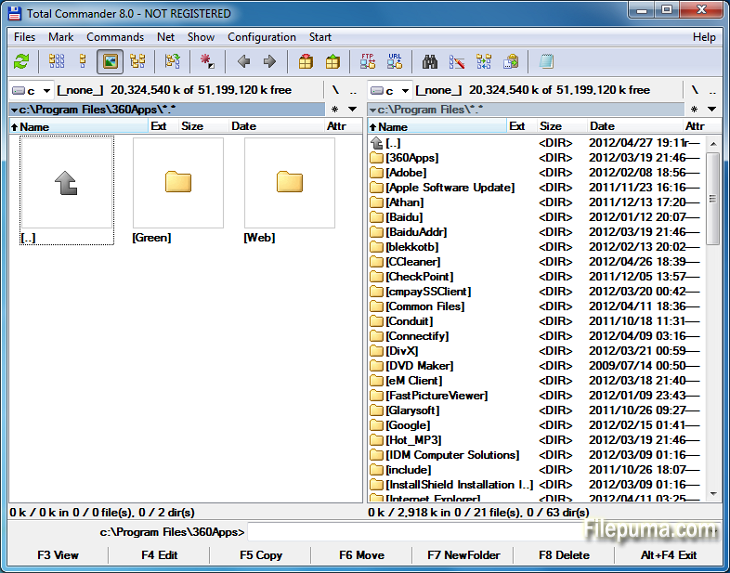


토탈 커맨더는 파일 작업을 간소화하고 향상시키는 강력한 파일 관리 소프트웨어입니다. 사용자 친화적인 인터페이스와 풍부한 기능으로 전 세계 사용자들 사이에서 엄청난 인기를 얻고 있습니다.
이 파일 매니저는 듀얼 패널 레이아웃을 제공하여 폴더와 파일을 나란히 볼 수 있으며, 디렉토리 간에 파일을 쉽게 드래그 앤 드롭할 수 있습니다. ZIP, RAR, 7-Zip과 같은 다양한 압축 형식을 지원하여 파일의 압축 및 해제를 원활하게 수행할 수 있습니다.
Total Commander의 주요 하이라이트 중 하나는 광범위한 플러그인 지원입니다. 사용자는 클라우드 스토리지 통합, 멀티미디어 처리 및 고급 파일 비교와 같은 추가 기능을 위해 수많은 플러그인을 추가하여 기능을 확장할 수 있습니다.
해당 소프트웨어는 맞춤 설정 옵션에서도 뛰어나며, 사용자가 인터페이스와 핫키를 자신의 선호에 맞게 개인화할 수 있게 합니다. 효율적인 검색 및 필터 도구는 파일을 빠르게 위치할 수 있도록 하여 시간과 노력을 절약해줍니다.
Total Commander는 보안과 안정성을 강조하여 중요한 작업이 안전하게 수행되도록 하여 실수로 파일이 삭제되거나 덮어쓰이지 않도록 합니다.
결론적으로, Total Commander는 파일 처리 과정을 단순화하고 생산성을 높이며 원활한 사용자 경험을 제공하는 신뢰할 수 있고 다재다능한 파일 관리 도구입니다. 초보자든 고급 사용자든 효율적이고 강력한 파일 관리 솔루션을 찾는 사람이라면 누구나 Total Commander를 꼭 갖추어야 할 유틸리티입니다.
죄송합니다, 번역할 문장이 필요합니다. 번역할 문장을 입력해 주세요.
주요 특징:
- 쉬운 파일 관리를 위한 듀얼 패널 인터페이스.
- 빠른 탐색을 위한 탭 브라우징.
- 사용자 정의 가능한 인터페이스.
- 아카이브 처리를 위한 내장 지원.
- 원격 파일 관리를 위한 FTP 및 네트워크 지원.
- 강력한 다중 이름 변경 도구.
- 디렉토리 동기화는 파일 비교 및 동기화에 사용됩니다.
- 효율적인 파일 조회를 위한 빠른 검색.
- 확장된 기능을 위한 Plugin 지원.
- 빠른 작업을 위한 풍부한 키보드 단축키.
새로운 소식은 무엇인가요?
File operations:
- F5 copy: First copy all files where the user doesn't need to be asked and skip all with errors, ask at the end
- F5 copy: Option to verify files after copying them.
- F5 copy: Option to keep paths relative to current folder while in branch view (Ctrl+B)
- Select and copy related files, e.g. *.jpg > crw*.cr2 selects/copies raw files only if there is a related .jpg file
- F8 Delete: Only warn at the end if folders couldn't be deleted
- F8 Delete: Always use new delete method when VistaDelete isn't set in wincmd.ini, but show our own delete confirmation dialog if the system dialog is disabled
- Support unpacking of more archive formats: 7zip, new RAR5 format, as well as -lh6- and -lh7- (LHA)
- RAR with encrypted file names: Show archive content after entering password
- Pack/unpack files: Option to remember last entered password until TC is minimized, Windows goes to standby, or the screen saver starts
- Alt+F5 pack: New option to leave out the names of the selected folders when packing each folder to a separate archive
- New wincmd.ini options CopyLinks and IgnoreLinks to handle file system links
- FTP/file system plugins: When editing a file with F4, the file will automatically be re-uploaded when saved in the edfitor. No need to close the editor any more. Change via Edit/View options.
- Support for touch screen devices: Tap on icons to select files (configurable), long tap to open context menu
- Support for high resolution screens (high DPI)
- Drive drop-down list (Alt+F1/Alt+F2): Show links to "My Computer" and "My Documents" Configurable via. ShowExtraDrives in wincmd.ini
- Drive drop-down list (Alt+F1/Alt+F2): Open context menu directly in the list without choosing a drive first
- Show exclamation mark to the left of some options as a warning, e.g. that files may not go where the user expects them to go, like during copying from branch view, or when packing and unpacking
- Show file size and last modified time also in virtual folders like connected MTP devices like Android phones/tablets
- Button bar: Support multiple internal and/or user-defined commands on a single button e.g. cm_SelectAll,cm_Copy
- Progress dialog: Show number of files/bytes in more functions. Switch to files/bytes remaining by clicking on the numbers
- Show thumbnails in virtual folders like libraries
- Option to remember position of background transfer manager in system menu (click on top-left icon)
- Improved background copy dialog: Show number of copied and selected files and bytes, add button "Foreground"
- Search for text supports any combination of ANSI, ASCII, UTF-16, UTF-8 Unicode and office XML/EPUB at the same time
- Skip a folder by clicking on its name in the status line (with confirmation). Also allows to just pause the search
- Open in separate process via Alt+Shift+F7, so TC can still be used during the search
- "Feed to listbox" also when searching in archives, on FTP servers and file system plugins
- Search for duplicate files: Search by plugin fields, e.g. name parts, file extension etc.
- Search for duplicate files, Feed to listbox: New dialog box to select files inside the groups of duplicates, e.g. by newest, oldest etc.
- Compare by content: "Resync comparison from here" now also works after editing the files
- Create/Verify CRC checksums: Also support SHA256 and SHA512 formats
- Show hidden/system files now split into separate options for hidden and system
- Option to get more items in various history lists, set via wincmd.ini: HistoryLen for directory history, OldCmdLineCount for command line. MaxItemsInComboBox for comboboxes in F7 New Folder, Alt+F7 Search, Num+ select files etc.
- Lister, right click menu: Directly search for selected text via Google in default browser (configurable)
다른 언어로 제공되는 프로그램
- Download Total Commander
- Télécharger Total Commander
- Herunterladen Total Commander
- Scaricare Total Commander
- ダウンロード Total Commander
- Descargar Total Commander
- Baixar Total Commander
사용자 리뷰
사용자 평가
 29
29
면허:
무료 체험
요구사항:
Windows All
언어들:
Multi-languages
크기:
3.5MB
출판사:
업데이트됨:
Feb 19, 2014
깨끗한
리포트 소프트웨어
최신 버전
구버전
개발자 소프트웨어
 Total Commander 11.56
 CrystalDiskInfo 9.7.2
 Update Detector 6.64.0.64
 Defraggler 2.22.995
 Recuva 1.54.120
 EaseUS Data Recovery Wizard Free 19.4.0
보안 수준
장치에 잠재적인 손상이 발생하지 않도록 하고 데이터 및 개인 정보를 보호하기 위해, 저희 팀은 새로운 설치 파일이 저희 서버에 업로드되거나 원격 서버에 연결될 때마다 이를 확인하고 주기적으로 파일을 검토하여 상태를 확인하거나 업데이트합니다. 이러한 검토를 기반으로 다운로드 가능한 파일에 대해 다음과 같은 보안 수준을 설정합니다.
 깨끗한
깨끗한
이 소프트웨어 프로그램이 안전할 가능성이 높습니다.
우리는 이 소프트웨어 프로그램과 관련된 파일과 URL을 세계 60개 이상의 주요 안티바이러스 서비스에서 검사했으며, 가능한 위협은 발견되지 않았습니다. 또한 서드파티 소프트웨어가 포함되어 있지 않습니다.
 경고
경고
이 프로그램은 광고 지원을 받으며 필수는 아닌 제3자 프로그램 설치를 제안할 수 있습니다. 여기에는 툴바 설치, 홈페이지 변경, 기본 검색 엔진 변경 또는 다른 제3자 프로그램 설치가 포함될 수 있습니다. 이러한 프로그램은 오탐일 수 있으며, 사용자들은 이 소프트웨어를 설치하고 사용할 때 주의할 것을 권장합니다.
 장애인
장애인
이 소프트웨어는 더 이상 다운로드할 수 없습니다. 이 소프트웨어 프로그램은 악성일 가능성이 높거나 보안 문제 또는 기타 이유가 있을 수 있습니다.
보고서를 제출하다
감사합니다!
귀하의 보고서가 전송되었습니다.
귀하의 요청을 검토하고 적절한 조치를 취하겠습니다.
이 보고서와 관련하여 취해지는 조치에 대한 알림은 받지 않으실 것임을 알려드립니다. 이로 인해 불편을 끼쳐 드려 죄송합니다.
웹사이트를 깨끗하고 안전하게 유지하는 데 도움을 주셔서 감사합니다.