

VirtualBox5.0.0-101573
 Kostenloser Download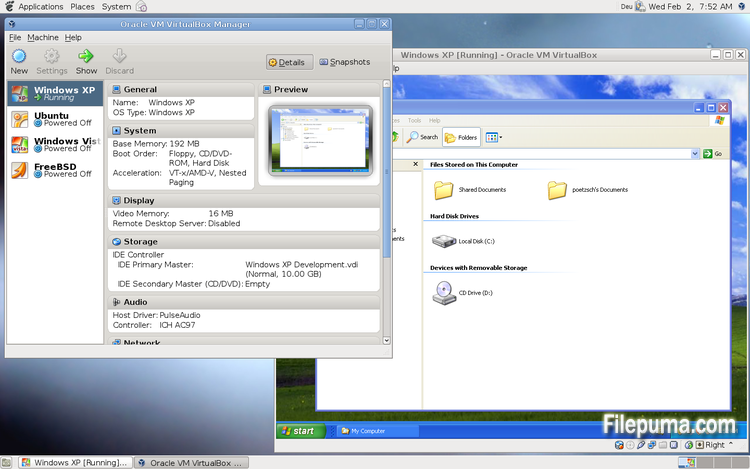
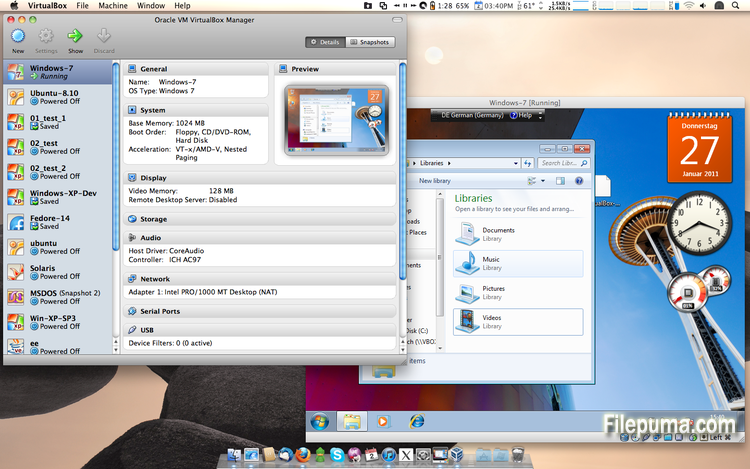
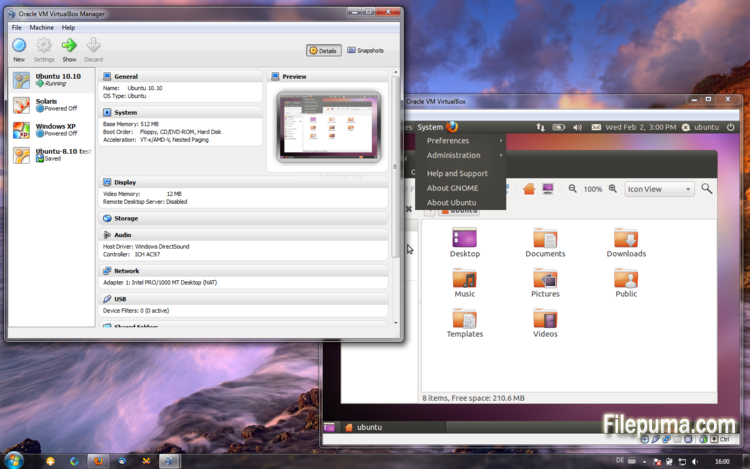


VirtualBoxist eine freie und quelloffene Virtualisierungssoftware, die es Benutzern ermöglicht, virtuelle Maschinen auf ihren Computern zu erstellen und auszuführen. Mit VirtualBox können Benutzer mehrere Betriebssysteme gleichzeitig auf ihrem Computer installieren und ausführen, ohne separate Partitionen erstellen oder zusätzliche Hardware kaufen zu müssen.
Einer der Hauptvorteile von VirtualBox ist die Benutzerfreundlichkeit. Es ist einfach zu installieren und einzurichten, selbst für diejenigen, die wenig oder keine Erfahrung mit Virtualisierungstechnologie haben. VirtualBox bietet auch eine Vielzahl von Anpassungsoptionen, einschließlich der Möglichkeit, die Menge an RAM, CPU-Kernen und Festplattenspeicher, die jeder virtuellen Maschine zugewiesen wird, anzupassen.
Ein weiteres großartiges Merkmal von VirtualBox ist seine Kompatibilität mit einer Vielzahl von Betriebssystemen. Benutzer können Windows, Linux, macOS und viele andere Betriebssysteme auf ihren virtuellen Maschinen installieren und ausführen. Dies macht es zu einem ausgezeichneten Tool für Entwickler, Softwaretester und alle, die mehrere Betriebssysteme auf einem einzigen Computer ausführen müssen.
VirtualBox bietet auch eine Reihe erweiterter Funktionen, wie z.B. Unterstützung für USB-Geräte, gemeinsame Ordner und Netzwerkadapter. Diese Funktionen ermöglichen es, Software auszuführen, die Hardware- oder Netzwerkressourcen benötigt, wie virtuelle Router, Firewalls und Server.
VirtualBox ist eine ausgezeichnete Wahl für jeden, der mehrere Betriebssysteme auf einem einzigen Computer ausführen muss. Seine Benutzerfreundlichkeit, die Vielzahl an Anpassungsoptionen und die Kompatibilität mit vielen verschiedenen Betriebssystemen machen es zu einem vielseitigen und leistungsstarken Werkzeug für Entwickler, IT-Profis und Heimanwender gleichermaßen.
Hauptmerkmal:
- Plattformübergreifende Kompatibilität.
- Intuitive grafische Benutzeroberfläche.
- Unterstützung für verschiedene Betriebssysteme.
- Nahtlose Integration mit dem Host-Betriebssystem.
- Snapshots und Klone.
- Netzwerkfähigkeiten.
- Unterstützung für virtuelle Geräte.
- Erweiterungspakete für zusätzliche Funktionalität.
Was gibt's Neues?
- Paravirtualization support for Windows and Linux guests to improve time-keeping accuracy and performance (see the manual for more information)
- Make more instruction set extensions available to the guest when running with hardware-assisted virtualization and nested paging. Among others this includes: SSE 4.1, SSE4.2, AVX, AVX-2, AES-NI, POPCNT, RDRAND and RDSEED
- xHCI Controller to support USB 3 devices (see the manual for more information)
- Drag and drop support (bidirectional) for Windows, Linux and Solaris guests
- Disk image encryption (see the manual for more information)
- VMs can now be started in separate mode. The VM process is started headless while the frontend runs as a separate process which can be terminated without stopping the VM.
- GUI: VM guest-content scaling support (including 3D acceleration)
- GUI: New User Interface settings page for customizing status-bar, menu-bar and guest-content scaling
- GUI: New Encryption settings tab for customizing encryption options for disk images
- GUI: HiDPI support including application icons and optional unscaled HiDPI output on Mac OS X (including 3D acceleration)
- GUI: Hotplugging support for SATA disks
- New, modular audio architecture for providing a better abstraction of the host audio backends
- Support for the NDIS6 networking framework on Windows (default on Vista and later)
In addition, the following items were fixed and/or added:
- VMM: improved timing on Solaris hosts with older VT-x hosts without preemption timers
- VMM: further improvements for TSC frequency measurements and guest timekeeping
- VMM: debug facility now includes the guest CPU's FPU/SSE/extended state in the core dump
- VMM: fixed a hang under rare conditions on 32-bit hosts
- VMM: several fixes
- GUI: improved HID LEDs synchronization for Mac and Windows hosts. The physical LEDs state now restored together with the VM state.
- GUI: take the guest screen aspect ratio into account for the preview window
- GUI: provide direct access to storage media in the VM selector
- GUI: allow to save the VM state from the selector even if the VM is already paused
- VBoxManage: when exporting an appliance, support the suppression of MAC addresses, which means they will be always recreated on import, avoiding duplicate MAC addresses for VMs which are imported several times
- VBoxManage: now supports renaming storage controllers and USB controllers
- Guest Control: major overhaul, for example fixing wrong parameter quoting (bug #13157)
- USB: added USB traffic capturing (see the manual for more information)
- Made resizing X11 guests work more reliably
- API: block the removal of the current snapshot if it has child snapshots (only relevant for VMs without snapshottable hard disks, their presence always prevented removal), which resulted in VM config corruption
- API: mark VM configs with snapshots but without current snapshot as inaccessible, as this combination is nonsense
- API: fix information for some automatically generated events (only with XPCOM, Windows host was not affected), which caused errors when getting some of the attributes over the webservice (bug #12379)
- API: fix crashes in Java API clients using the XPCOM binding, happened with output parameters only (bug #11232)
- API: a number of settings (e.g. network settings) can now also be changed when the VM is in saved state
- API: fixed incorrect resuming of VMs on host-resume unless they were previously paused due to a host-suspend
- API: don't lose the saved state and "current state changed" flag during cloning of a VM
- API: OS type description consistency fix (bug #14162)
- VBoxSVC: don't keep the support driver permanently open
- Main/Properties: properly drop transient guest properties when the VM is powered off
- VRDP: fixed a couple of races which may cause a crash during VM poweroff
- ExtPack: don't fail if the TMP directory contains non-latin1 characters (bug #14159)
- 3D: fix potential race in which might cause a crash on VM termination
- 3D: fixed a possible memory leak in the host service
- Serial: new TCP/IP backend (see the manual for more information)
- Storage: added USB mass storage device class (see the manual for more information)
- Storage: added vbox-img standalone tool for direct manipulation of virtual hard disk images without VBoxManage
- Storage: fixed crash as a result of I/O errors in certain conditions (bug #13105)
- NAT: fixed several potential crashes
- NAT: don't forcibly reset/drop all connections when the link goes down
- Netsniffer: properly handle changing of the trace file name at VM runtime
- Audio: fixed audio output and input when changing the default audio device more than once on OS X
- Audio: fixed audio input on OS X under certain circumstances
- ICH9: fixed the interrupt disable logic for MSI interrupts; should fix old Linux guests with AHCI
- USB: improve playback with USB sound devices attached to the emulated OHCI controller
- Audio: provide Linux guests a different AC97 audio codec type so Linux ALSA does not mis-detect the link speed (default for new VMs)
- BIOS: fix for booting from SCSI CD/DVD media
- BIOS: fix for reads partially beyond end of disk (bug #14021)
- VRDP: fixed listening for IPv6 on some systems (bug #14038)
- rdesktop-vrdp: upgraded to version 1.8.3
- Linux hosts: fixed a bug which made the netfilter driver ignore certain events (bug #12264)
- Mac OS X hosts: El Capitan fixes
- Mac OS X hosts: fixed a bug which might trigger a host kernel panic if a VM is started and another hypervisor is active
- Solaris hosts: installer fix for very recent versions of Solaris
- Guest Additions: added a heartbeat service (see the manual for more information)
- Linux hosts / guests: support for Linux distributions using systemd without sysv emulation (e.g. ArchLinux)
- Windows Additions/WDDM: improved video memory utilization and allow more/bigger guest screens with large resolutions (including HiDPI)
- Linux Additions: added -s parameter to mount.vboxsf to be sloppy with invalid parameters
- X11 Additions: fixed wrong DPI value (bug #14151)
- Mac OS X guests: limit the CPU family for legacy guests
- Solaris Additions: added quiesce support to co-operate with Solaris' fast-reboot feature
Programm in anderen Sprachen verfügbar
- Download VirtualBox
- Télécharger VirtualBox
- Scaricare VirtualBox
- ダウンロード VirtualBox
- Descargar VirtualBox
- Baixar VirtualBox
Nutzerbewertungen
Benutzerbewertung
 101
101
Lizenz:
Kostenlos
Anforderungen:
Windows All
Sprachen:
Multi-languages
Größe:
111MB
Verleger:
Aktualisiert:
Jul 9, 2015
Sauber
Melden Sie die Software
Neueste Version
Alte Versionen
Entwicklersoftware
 VirtualBox 7.2.4
 Adobe Air 51.2.2.6
 Java Runtime Environment (32bit) 8 Update 471
 Java Runtime Environment (64bit) 8 Update 471
 Java Development Kit (64bit) 8 Update 471
 Python (64bit) 3.14.2
Sicherheitsstufen
Um möglichen Schaden an Ihrem Gerät zu vermeiden und die Sicherheit Ihrer Daten und Privatsphäre zu gewährleisten, überprüft unser Team jedes Mal, wenn eine neue Installationsdatei auf unsere Server hochgeladen oder mit einem entfernten Server verknüpft wird, und überprüft die Datei regelmäßig, um ihren Status zu bestätigen oder zu aktualisieren. Auf der Grundlage dieser Überprüfung legen wir die folgenden Sicherheitsstufen für alle herunterladbaren Dateien fest.
 Sauber
Es ist sehr wahrscheinlich, dass dieses Softwareprogramm sauber ist.
Wir haben Dateien und URLs, die mit diesem Softwareprogramm verbunden sind, in mehr als 60 der weltweit führenden Antiviren-Dienste gescannt; es wurden keine möglichen Bedrohungen gefunden. Außerdem ist keine Drittanbieter-Software gebündelt.
 Warnung
Dieses Programm wird durch Werbung unterstützt und kann anbieten, Drittanbieterprogramme zu installieren, die nicht erforderlich sind. Diese können eine Toolbar, das Ändern Ihrer Startseite, Standard-Suchmaschine oder die Installation anderer Party-Programme umfassen. Diese könnten Fehlalarme sein, und unseren Benutzern wird geraten, beim Installieren und Verwenden dieser Software vorsichtig zu sein.
 Behindert
Diese Software ist nicht mehr zum Download verfügbar. Es ist sehr wahrscheinlich, dass dieses Softwareprogramm bösartig ist, Sicherheitsprobleme hat oder andere Gründe vorliegen.
Einen Bericht einreichen
Danke!
Ihr Bericht wurde gesendet.
Wir werden Ihre Anfrage überprüfen und entsprechende Maßnahmen ergreifen.
Bitte beachten Sie, dass Sie keine Benachrichtigung über Maßnahmen erhalten, die aufgrund dieses Berichts ergriffen wurden. Wir entschuldigen uns für eventuelle Unannehmlichkeiten.
Wir schätzen Ihre Hilfe dabei, unsere Website sauber und sicher zu halten.